
NinjaTrader at a glance
NinjaTrader is a futures brokerage and platform ecosystem built around charting, order flow, simulation, replay, automation, and active order management. Customers can use desktop, browser, and mobile interfaces and trade more than 100 contracts across CME Group, Eurex, ICE, and Coinbase Derivatives under current product availability.
The platform is highly capable, but futures combine leverage, daily settlement, fast price movement, expiration, and contract-specific rules. A $50 intraday margin does not cap loss at $50 and should never be interpreted as a recommended account size.
| Review question | DollarScout finding |
|---|---|
| Best for | Self-directed futures traders using charts, order flow, simulation, or automation |
| Pricing choice | Free, $99 Monthly, or $1,499 Lifetime plan |
| Published commissions | $0.09–$0.39 Micro and $0.59–$1.29 Standard per side by plan |
| Platform coverage | Desktop, Web, and Mobile with SuperDOM and simulation |
| Main limitation | Futures-only specialization and layered per-contract/data/account costs |
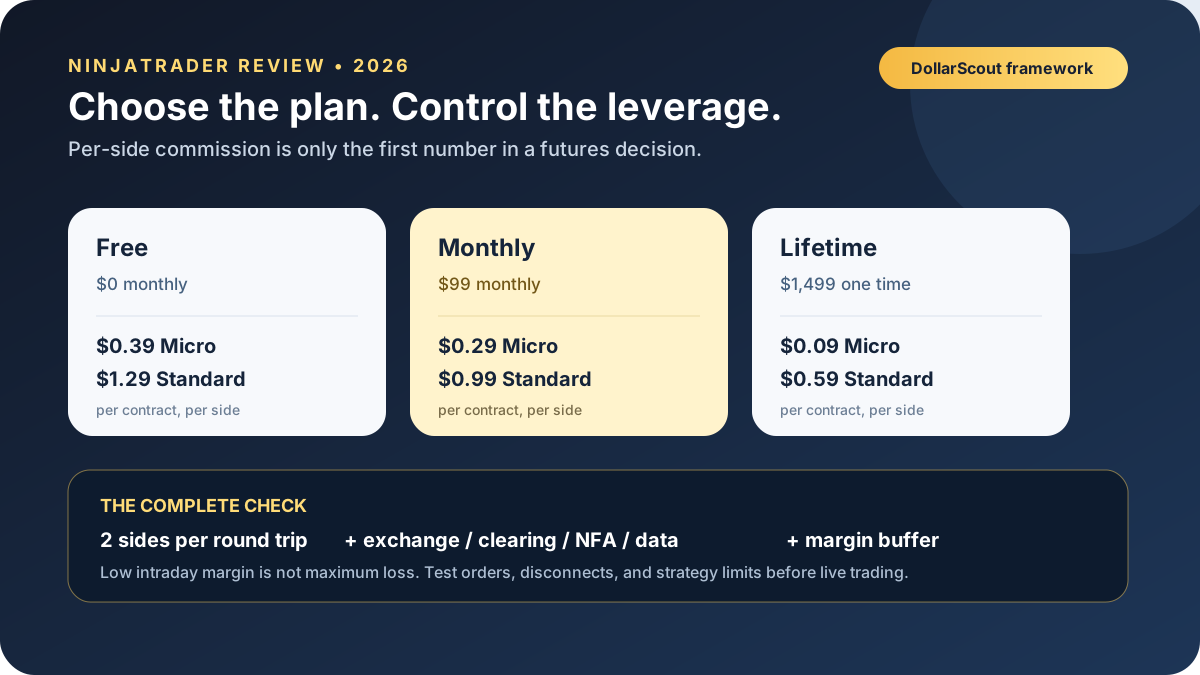
Free, Monthly, and Lifetime plans
Trading Costs scores 4.0/5. The Free plan has no monthly platform charge and lists $0.39 per side for Micro futures and $1.29 for Standard contracts. The Monthly plan costs $99 per month and lowers those commissions to $0.29 and $0.99. The Lifetime plan costs $1,499 once and lists $0.09 and $0.59.
These are per-side commissions. A round trip is twice the displayed rate. Exchange, clearing, and NFA fees apply on top, and product-specific all-in costs vary. Market data, add-ons, activity, liquidation, wire, transfer, and other account services can create additional expense.
The paid plan decision is arithmetic. For Micro contracts, Monthly saves $0.20 per round trip versus Free. Ignoring other differences, roughly 495 Micro round trips in a month would offset $99. For Standard contracts the saving is $0.60 per round trip, or roughly 165 round trips. Actual break-even changes with contract mix, taxes, plan terms, and fees.
Lifetime saves $0.60 per Micro round trip and $1.40 per Standard round trip versus Free. The one-time payment is sunk if the customer stops trading, switches broker, or no longer needs the platform. Use a conservative trading horizon and do not increase activity just to justify a license.
Exchange, clearing, NFA, and account fees
NinjaTrader’s pricing page explicitly separates its commission from exchange, clearing, and NFA charges. The current account-fee schedule should be reviewed for every contract and service.
Current published examples include a clearing fee per side, exchange data subscriptions, an activity fee for certain unfunded or nontrading live-data use, and risk-liquidation charges. Exchange fees differ by venue and contract, so an ES, MES, CL, FDAX, and crypto future cannot be priced from one headline.
The platform lists a $35 activity fee for Free-plan brokerage accounts that log into the trading platform but do not place a live trade during a rolling 30-day period, subject to stated exceptions and current terms. Do not place an uneconomic trade merely to avoid a fee; close or change services appropriately.
Reconcile the statement by component. Platform commission, exchange, NFA, clearing, data, and any risk or service fee should each map to a documented schedule.
Account opening and funding
NinjaTrader advertises no minimum deposit to open a futures account. ACH and debit-card transfers have a $5 minimum. An account must be funded above $0 to activate live plan benefits, real-time data, trading access, and add-ons.
No opening minimum does not mean a tiny balance can support a strategy. Account capital must absorb intraday margin, adverse movement, commissions, market gaps, initial margin near session close, and a buffer above liquidation levels.
Futures customer funds have a different legal and protection structure from securities or bank deposits. They are not SIPC-insured equity positions or FDIC-insured deposits. Read the FCM disclosures and account agreement.
Intraday, initial, and maintenance margin
NinjaTrader advertises intraday margins from $50 on Micro contracts and $500 on popular standard contracts. Contract requirements vary. The broker can raise margins, including around high-impact news, volatility, or risk events.
Intraday margin applies only during the broker’s specified period. NinjaTrader states that initial margin can apply beginning 15 minutes before the trading session closes. Holding a position too late without enough equity can trigger rejection or liquidation.
Margin is a performance bond, not a down payment on a capped-loss product. One Micro E-mini S&P 500 point represents $5 and one standard E-mini point $50. A move larger than the deposited margin can create a much larger loss, especially during a gap or thin market.
Maintain excess margin well above the minimum, define a maximum number of contracts, and know the time at which requirements change for every product traded.
Desktop platform
Platform scores 4.7/5. NinjaTrader Desktop is the deepest interface. It supports customizable workspaces, advanced charts, more than 100 indicators, SuperDOM depth-of-market ladders, Market Analyzer, strategy development, backtesting, simulation, market replay, and an ecosystem of add-ons.
Desktop is particularly strong for traders who want to build indicators or automated strategies. That flexibility creates software risk. A strategy can behave differently because of data series, fill model, session template, time zone, contract rollover, disconnection, or code error.
Version changes and third-party extensions should be tested in a separate workspace before live use. Export templates, document dependencies, and keep a manual order-management path.
Web and mobile platforms
NinjaTrader Web provides cloud-based charts, watchlists, SuperDOM, order entry, positions, and performance views from a browser. Mobile extends core futures monitoring, charts, depth, and order management to iOS and Android.
The three interfaces do not have identical capabilities. Desktop remains the center of advanced development and automation. Web and mobile are useful for access and risk management but should not be treated as perfect substitutes for a complex desktop workflow.
Test bracket behavior, order cancellation, synchronization, and session state on each interface. Protect mobile access with biometrics and strong authentication, and avoid submitting a complicated order from an unreliable connection.
Simulation and market replay
Trading Tools scores 4.8/5. NinjaTrader provides free charting, strategy backtesting, and simulated trading without a time limit, plus a limited trial of streaming data for eligible new accounts. Market Replay lets users rehearse historical sessions.
Simulation is valuable for platform mechanics, order templates, daily routines, and reviewing rule adherence. It does not reproduce every queue position, partial fill, slippage event, outage, emotion, margin call, or emergency liquidation.
Use conservative fill assumptions and introduce realistic commissions. A simulated strategy should survive different volatility regimes, out-of-sample data, delayed entries, and worse-than-expected exits before it risks real capital.
Order flow and charting
SuperDOM displays depth and supports ladder-based order entry. Order Flow+ and related tools can include volumetric bars, cumulative delta, VWAP, trade detection, and depth-oriented views depending on plan and entitlement.
Order-book data is not a complete map of future buying and selling. Displayed liquidity can be cancelled, hidden liquidity may exist, and feeds differ. Order-flow tools describe observed activity; they do not guarantee direction.
More indicators do not necessarily improve a process. Define which data answers which question, remove redundant signals, and test whether the rule changes behavior rather than only making the chart look precise.
Execution and order management
Execution Speed scores 4.5/5. NinjaTrader offers ladders, chart trading, ATM strategy templates, bracket-style management, and multi-device access designed for active futures execution.
DollarScout did not measure latency or fill quality. An automated stop or target still depends on order state, market liquidity, exchange rules, connectivity, and the specific order type. Stop orders can fill far from the trigger in a fast market.
Record submission, acknowledgement, fill, cancellation, rejection, and connection events. Know whether protective orders reside locally, at the broker, or at the exchange, and what happens after the platform disconnects.
Strategies, APIs, and add-ons
NinjaScript and the third-party ecosystem support custom indicators, automated strategies, data connections, and specialist analysis. This is a major advantage for a technically capable trader.
Third-party software adds vendor, security, licensing, update, and support risk. NinjaTrader’s availability of an add-on does not prove profitability or suitability. Review permissions, code behavior, data collection, renewal terms, and vendor access before installation.
Never run an unfamiliar automated strategy with unrestricted position size. Start in simulation, cap contracts, use daily and account-level loss controls, and maintain a kill switch outside the strategy itself.
Markets and contract lifecycle
NinjaTrader advertises access to more than 100 futures across CME Group, Eurex, ICE, and Coinbase Derivatives. Contracts can cover equity indexes, energy, metals, rates, currencies, agriculture, and cryptocurrency.
Each product has a multiplier, tick value, trading hours, settlement method, expiration cycle, price limits, margin, and exchange fee. Some contracts can involve physical delivery if not closed or rolled under the applicable rules.
Use the active contract month and understand rollover. Historical charts can be back-adjusted while the actual tradable contracts expire, which can create differences between analysis and orders.
Support and emergency procedures
Customer Service scores 4.4/5. NinjaTrader publishes 24/5 support and maintains platform training, documentation, forums, and an emergency trade desk. Futures-specific educational resources are extensive.
DollarScout did not call support or test an emergency liquidation. Save the emergency number and account identifier offline. During an incident, record order IDs, contracts, quantities, platform and connection status, timestamps, screenshots, and every instruction received.
General training is not individualized trading advice. Support can explain platform or account mechanics but does not decide whether leverage is appropriate.
NinjaTrader versus alternatives
Choose tastytrade when listed options and a coherent multi-asset derivatives workflow matter more than specialized futures charting. Choose TradeStation when equities, EasyLanguage, portfolio testing, and a broader systematic-trading environment are central.
Interactive Brokers provides much wider global multi-asset access and institutional order types. A mainstream brokerage is better for stocks, ETFs, retirement accounts, advice, and diversified long-term portfolios.
Who NinjaTrader is best for
NinjaTrader fits customers who:
- Focus on futures and understand contract multipliers and expiration.
- Want simulation, replay, SuperDOM, order flow, or strategy development.
- Can calculate plan break-even from realistic round trips.
- Maintain margin well above the advertised intraday minimum.
- Document software, data, and emergency controls.
It is weaker for passive investors, advice seekers, multi-asset households, and anyone attracted mainly by low margin without understanding leverage.
Bottom line
NinjaTrader earns 4.5/5. Its platform and tool scores reflect a genuinely deep futures workflow across desktop, web, mobile, simulation, replay, charting, and automation.
The right plan is the one supported by expected volume after exchange and account costs—not the one with the smallest commission in the table. Treat margin as a minimum operational requirement, maintain a substantial buffer, and prove the process in conservative simulation before trading live.


