Many products on this page are from partners who compensate us. This doesn't influence our ratings. Our opinions are our own.
Hot Wallets vs. Cold Wallets
By Sophie Brown, Senior Finance Editor · Updated Jul 2026 · Fact-checked Jul 18, 2026
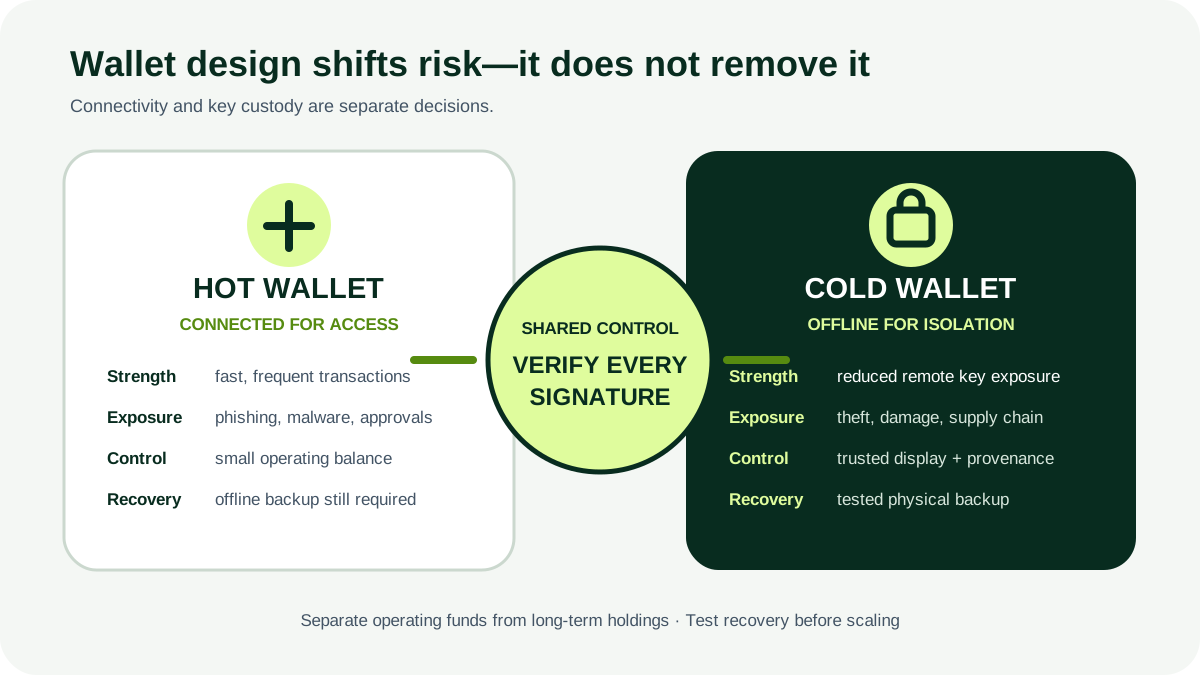
A crypto wallet stores or controls the private keys used to authorize transactions; it does not hold coins like a physical wallet. A hot wallet keeps key access on an internet-connected system, while cold storage keeps signing material offline most of the time. Neither is automatically safe. The correct design matches transaction frequency, recovery ability, device security, and the consequences of loss.
Key takeaways
- Hot versus cold describes connectivity; self-custody versus third-party custody describes who controls the keys.
- Hot wallets improve access but increase exposure to phishing, malware, account takeover, malicious approvals, and device compromise.
- Cold wallets reduce online exposure but introduce supply-chain, physical loss, backup, firmware, signing, and recovery risks.
- Separate a small transaction balance from long-term holdings and test both sending and recovery before increasing the amount.
- A seed phrase or private key must never be photographed, placed in cloud storage, typed into support chat, or shared with anyone.
Separate the two decisions people often combine
The first decision is who controls the private keys:
- In self-custody, the user controls the keys and bears security and recovery responsibility.
- In third-party custody, a platform or custodian controls the keys and the customer has a contractual claim or account relationship.
The second decision is whether the signing environment is normally connected to the internet:
- A hot wallet is internet-connected, such as a mobile, desktop, browser, or web wallet.
- A cold wallet keeps key material offline most of the time, often using dedicated hardware or an offline signing process.
A custodian can use both hot and cold wallets internally. A self-custody wallet can also be hot or cold. “Cold” does not prove self-custody, and “wallet” in a platform interface may only be an account balance rather than a user-controlled key.
Understand what the wallet contains
Investor.gov and the IRS describe a wallet as a means of storing private keys used to access digital assets recorded on a distributed ledger. The blockchain records the asset and transaction state. The wallet creates or stores credentials and prepares signatures.
A public address can receive assets and may be shared for that purpose. A private key authorizes transactions and must remain secret. Many wallets derive multiple keys and addresses from a seed phrase. Anyone who obtains that recovery phrase may be able to reconstruct the wallet and move the assets without the original device.
Losing a phone does not necessarily lose the assets if a valid recovery path exists. Keeping the device does not protect the assets if the seed phrase was copied. The real security boundary includes the device, software, recovery material, authentication, transaction display, user behavior, and any custodian.
Where hot wallets are useful
Hot wallets support frequent transactions and application connections. A mobile wallet can scan a payment address. A browser wallet can interact with a decentralized application. A custodial hot account can make trading convenient.
That convenience creates exposure:
- phishing sites can imitate wallet interfaces;
- malicious extensions can alter transactions;
- malware can capture clipboard addresses or keystrokes;
- a compromised email or platform account can enable withdrawal;
- a phone or computer can be lost, stolen, or remotely controlled;
- broad token approvals can let a contract spend assets later;
- cloud backups can copy sensitive material outside the intended boundary.
Use a hot wallet as an operating balance, not an unlimited vault. Set the amount according to what is needed for near-term activity and what can be lost without financial harm.
Where cold storage is useful
Cold storage can reduce remote attack surface for assets that rarely move. A dedicated hardware wallet typically keeps keys inside the device and signs a transaction after the user confirms details. Another design uses an offline computer to sign a transaction that is transferred to an online system for broadcast.
Cold storage does not eliminate risk. It changes it:
- a counterfeit or tampered device can compromise keys;
- unverified firmware or wallet software can misrepresent a transaction;
- the device can be lost, damaged, seized, or destroyed;
- the seed backup can be stolen or become unreadable;
- heirs may not know how to recover funds;
- the user can approve a malicious destination on a genuine device;
- an overly complex scheme can fail during an emergency.
Paper wallets and improvised offline methods can create printer, randomness, change-address, scanning, and physical deterioration risks. Cold storage should be a documented process, not merely a disconnected gadget.
Compare the threat models
| Risk | Hot wallet | Cold wallet |
|---|---|---|
| Remote malware/phishing | Higher exposure because signing system is online | Lower key exposure, but transaction preparation can still be compromised |
| Physical theft | Device and unlocked session matter | Device and backups become prominent targets |
| Transaction speed | Usually faster and more convenient | Requires device or offline signing steps |
| Recovery | Often integrated but can expose backups online | Must be designed, stored, and tested deliberately |
| Application interaction | Convenient for frequent connections | Safer when isolated, but repeated use reduces the cold boundary |
| Supply chain | App store, extension, download, and device risks | Hardware provenance, packaging, firmware, and companion-app risks |
| User error | Wrong address, network, approval, or credential disclosure | Same transaction errors plus backup and signing complexity |
Choose controls for the most plausible loss path. A person targeted by remote phishing has a different threat model from a business with employees, physical access, and approval duties.
Select wallet software or hardware carefully
Verify the publisher, official domain, repository or app-store identity, supported assets and networks, update process, backup standard, security documentation, and ability to export or recover. Search for independently disclosed vulnerabilities and how the maintainer responded.
For hardware:
- Buy from the manufacturer or a verifiable authorized channel.
- Inspect packaging, but do not treat a sticker as proof of integrity.
- Initialize the device yourself.
- Reject any device that arrives with a prewritten seed phrase or PIN.
- Verify firmware through the official tool and confirm addresses on the device display.
For software, avoid search ads and direct-message download links. Check the exact publisher and domain. Remove unused browser extensions and do not use a daily browsing profile for high-value signing if a separate profile or device is practical.
Open-source code can improve inspectability but does not guarantee that the installed binary matches the reviewed code, that reviewers found every flaw, or that governance cannot change.
Create and protect recovery material offline
Generate the wallet in a private environment where no camera, screen sharing, or untrusted person can observe. Write the recovery phrase exactly in order using durable material suited to the physical risks. Confirm the backup through the wallet’s verification flow without typing it into an unrelated device.
Never:
- photograph or scan the phrase;
- save it in email, notes, cloud storage, or a password-manager attachment unless the entire design deliberately addresses that risk;
- print it on a network printer;
- enter it into a website or support form;
- share it with a custodian, developer, influencer, police impersonator, or recovery service.
Store backups against theft, fire, water, and accidental disposal. A single backup is fragile; multiple copies increase theft exposure. Separate locations can reduce disaster risk, but every location needs access control and an inventory.
A passphrase added to a seed can create a separate wallet, but a forgotten or mistyped passphrase can permanently block recovery. Do not add complexity that cannot be documented and tested.
Test recovery before meaningful funding
A backup is only a theory until tested. Begin with a new wallet and a trivial amount. Record a receiving address, send the test amount, reset or use a separate compatible recovery environment according to the wallet’s official procedure, restore the wallet, and verify the expected addresses and balance.
This test must be designed so it does not expose the seed. Do not enter a hardware-wallet seed into a random desktop wallet merely for convenience. Use a procedure appropriate to the wallet and threat model.
After recovery succeeds, document:
- wallet type and supported recovery standard;
- device and firmware identification;
- backup locations without writing the phrase in the document;
- update and test schedule;
- trusted-person or estate procedure;
- actions after suspected compromise.
Review the process after device replacement, firmware changes, relocation, or changes in household and business access.
Verify every transaction on the trusted display
When sending, check the asset, blockchain network, complete destination address, amount, fee, and any contract interaction. Compare the beginning, middle samples, and end of the address; for a high-value transaction, use a saved allowlist and a small test first.
Do not trust only the address displayed on an internet-connected computer. Malware can substitute clipboard content or alter a web interface. A hardware device’s independent display is valuable only if the user reads and understands it.
For token or DeFi activity, distinguish a simple transfer from a contract approval. An approval may authorize future spending up to a limit. Prefer limited amounts and durations when supported, review existing allowances, and revoke those no longer needed. Revocation is another onchain transaction and must also be verified.
Use the correct network. Identical-looking addresses across networks do not guarantee the recipient supports that network. Confirm destination requirements independently.
Use a tiered wallet architecture
A practical design separates functions:
- Custodial transaction account: temporary funds for buying or selling, protected with strong MFA and withdrawal controls.
- Hot self-custody wallet: a small amount for near-term payments or applications.
- Cold long-term wallet: assets that do not need frequent signing.
This limits the damage from one compromise. Do not reuse the cold wallet for every experimental contract, airdrop, or unknown token. Moving the cold device online frequently and signing opaque transactions undermines its purpose.
Set transfer thresholds. A business may require two-person review, separate devices, and a written address-verification process. Multisignature can reduce a single-key failure but adds coordination, compatibility, backup, and governance risks. Test signer loss and recovery before relying on it.
Plan for loss, compromise, and succession
Define incident triggers: a seed phrase was viewed, a device was lost, unknown firmware appeared, an unexpected transaction occurred, or a custodian froze withdrawals. A potentially exposed seed should be treated as compromised. Move assets to a newly generated wallet through a verified process rather than merely changing an app password.
Maintain watch-only monitoring where practical so balances and transactions can be reviewed without exposing signing keys. Use alerts from custodians and explorers carefully; bookmarks and known addresses reduce phishing risk.
Estate planning must balance secrecy with recoverability. Heirs need legal authority, enough instructions to locate and use the recovery process, and protection from discovering the secret too early. Coordinate with an estate attorney familiar with digital assets. Do not put a seed phrase directly in a publicly filed will.
Avoid common wallet scams
No legitimate support agent needs a seed phrase. “Wallet synchronization,” “validation,” “rectification,” “migration,” or “unlocking” sites that request it are attempting to take control. A genuine airdrop does not justify signing an unreadable approval with a high-value wallet.
Ignore unsolicited recovery services promising to reverse a blockchain transaction for an advance fee. If a custodian account is involved, contact it through a verified channel immediately, preserve transaction IDs and communications, and report fraud to the appropriate authorities.
A wallet selection checklist
Use a hot wallet when the amount is limited, transactions are frequent, the device is hardened, and loss is tolerable. Use cold storage when assets rarely move, the owner can verify the device and transaction, and the recovery and physical-security plan has been tested.
For either design, confirm:
- who controls the keys;
- what happens after device or custodian failure;
- how the wallet is updated and authenticated;
- where recovery material exists;
- how a transaction is independently verified;
- how access transfers after incapacity or death.
Bottom line
Hot and cold wallets are not a contest with one winner. Hot wallets optimize access; cold wallets reduce online exposure. Both can fail through bad recovery, malicious transactions, physical compromise, or an unsuitable custodian. Separate operating and long-term balances, verify every signing step, protect recovery material offline, and test recovery with a small amount before trusting the system.
Related content
Frequently asked questions
Sources
Related content
More from DollarScout on this topic.
