
TaxAct at a glance
TaxAct is online and desktop tax software with DIY, expert-assisted, and full-service choices. The online consumer lineup for 2025 individual returns filed in 2026 includes Free, Deluxe, Premier, and Self-Employed products.
Federal prices are competitive, particularly for Self-Employed. The current $64.99 per-state price on paid tiers can erase that advantage for a household filing in more than one state.
| Review question | DollarScout finding |
|---|---|
| Best for | Experienced DIY filers who know their required forms |
| Federal pricing | $0, $59.99, $99.99, or $109.99 by tier |
| Paid state pricing | $64.99 per state return filed |
| Expert path | Xpert Assist for advice; Full Service for preparation |
| Main weakness | State charges and add-ons change the value calculation |
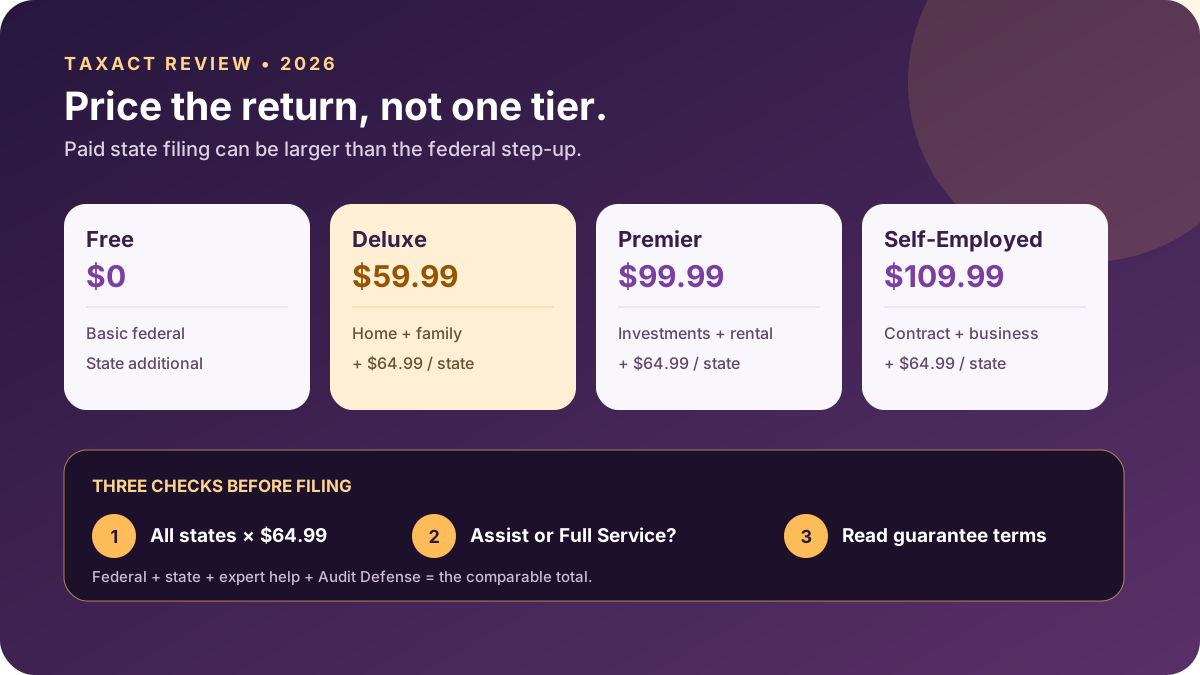
Free, Deluxe, Premier, and Self-Employed
Price scores 4.2/5. Free costs $0 for a qualifying basic federal return and targets W-2 employees, students, and selected family credits. TaxAct says roughly 40% of its prior-year filers qualified based on income and deductions. The eligibility language matters more than the percentage: a basic Form 1040 without additional schedules is a much narrower return than the word free may imply.
Deluxe costs $59.99 federal plus $64.99 per state. It adds guidance for homeowners, child and dependent care, education, and health savings accounts. Premier costs $99.99 plus state and covers investment sales, crypto, rental property, a home sale, and FBAR filing. Self-Employed costs $109.99 plus state for contractors, freelancers, rideshare work, and sole proprietors.
These are current public prices, not a permanent promise. TaxAct advertises promotions and can change pricing without notice. Compare the price shown for the exact product on the filing date.
The state-return cost
State price is TaxAct's largest value limitation. One Deluxe federal return and one state currently total $124.98. Premier plus one state is $164.98; Self-Employed plus one state is $174.98. Two paid states add $129.98.
State obligations can arise from moving, working remotely, owning rental property, operating a business, or receiving income in another jurisdiction. Some states have reciprocal agreements, credits, or special nonresident rules, but software price should never drive an unsupported filing decision.
Prepare a state inventory before choosing the product. Include resident, part-year, nonresident, city, and local returns, then compare the all-in result with competitors. TaxAct's IRS Free File offer has different qualification and state terms from its ordinary commercial Free product; eligible customers should enter through IRS.gov rather than assuming the offers are identical.
Interview and workflow
Ease of Use scores 4.2/5. TaxAct follows a recognizable interview through personal information, income, adjustments, deductions, credits, health coverage, taxes, payments, and state returns. Users can start without paying and see a running refund or balance.
The interface is direct and works well for someone who understands the shape of the return. Guidance is available, but the experience is less explanatory and less forgiving than the most polished premium competitor. A first-time investor or sole proprietor may need to consult form instructions more often.
Treat the refund meter as an arithmetic output, not an incentive. Enter documents in a controlled order, reconcile section totals, and review the actual forms. A large unexpected movement after one answer is a reason to investigate, not celebrate.
Imports and mobile filing
TaxAct supports W-2 import and document capture, prior-year carryover, and a mobile experience for eligible returns. Current company material also describes a modernized mobile app and on-the-go document workflow.
Imported data can still be incomplete or mapped incorrectly. Compare employer identification numbers, wages, withholding, state boxes, retirement codes, capital-gain basis, and 1099 totals with each source. Corrected 1099 statements issued later can require an amendment.
For a first-year migration, compare the imported prior-year filing status, dependents, carryovers, depreciation, capital losses, and estimated payments with the signed prior return. A name and address import is convenient; a missing tax attribute can be expensive.
Xpert Assist
Support scores 4.3/5. Xpert Assist is an optional service layered onto consumer DIY products. It provides access to credentialed U.S.-based tax experts, and the current public flow shows the service as a $45 addition in eligible combinations.
Unlimited refers to the number of expert contacts, not unlimited subject matter or availability. TaxAct states that hours and appointment capacity are limited, some topics may be excluded, and the broad final review does not extend to source documents and is not comprehensive.
The filer still owns data entry and signs the self-prepared return. Before relying on an answer, state the tax year, jurisdiction, document, and exact facts. Save the question and answer, then verify that the final form reflects the advice.
Xpert Full Service
TaxAct also offers Xpert Full Service, with current consumer pricing advertised from $99 before state charges and form-based additions. A credentialed professional collects documents, prepares the return, and files after customer review.
Full Service is not interchangeable with Assist. It changes who prepares and signs the return, the document workflow, and the price. Confirm whether the quote includes every W-2, 1099, Schedule C, Schedule E, K-1, state, amendment, and follow-up question.
The taxpayer must still provide complete records and review the result. A signed preparer is a valuable control but cannot discover an account or transaction that was never disclosed.
Accuracy tools and $100,000 guarantee
Accuracy Tools scores 4.5/5. TaxAct Alerts checks the return for incomplete or inconsistent information before filing. The company also publishes a $100,000 Accuracy Guarantee for qualifying self-prepared individual 1040 products.
The written summary says that if a software error produces a smaller refund or higher liability than the same data in another product, TaxAct can refund software fees, pay the tax difference determined by the authority, and cover resulting penalties, interest, and reasonably documented legal and audit costs up to $100,000, subject to eligibility and terms.
That is broader than a simple penalty-and-interest guarantee, but it does not insure incorrect or omitted user data. Do not override calculated fields without understanding the effect. Resolve program alerts, retain the original input documents, and follow notice and claim deadlines precisely.
Maximum Refund Guarantee
Refund Guidance scores 4.4/5. TaxAct's Maximum Refund Guarantee says that if the same information entered into another online preparation product produces a larger refund or smaller tax due, TaxAct will refund the applicable federal and/or state software purchase price.
Other fees are excluded. The remedy is the software purchase price, not generally the refund difference. A valid comparison must use the same information and satisfy the terms.
Refund size is also influenced by withholding and estimated payments. Judge the software by whether it supports a correct return and surfaces lawful deductions and credits, not by whether the displayed refund is larger before all income is entered.
Audit Defense and notices
TaxAct sells Audit Defense for $54.99 through Protection Plus under the current page. It covers eligible federal and state audits for the enrolled return year and must be purchased before receiving a notice.
Audit Defense is different from software support or a guarantee claim. Read the representation scope, exclusions, communication method, and enrollment deadline. A notice received before purchase is not retroactively covered.
Verify any IRS or state notice independently. Preserve the envelope, response date, filed return, source documents, and proof of payments. For a material dispute, unusual legal position, business matter, or potential fraud issue, independent representation may be appropriate.
Security
TaxAct states that it uses advanced encryption, access controls, and information-security policies to protect personal and financial data. The product's controls operate alongside the customer's account hygiene.
Use a unique password, multifactor authentication, a secured email account, and an IRS Identity Protection PIN where appropriate. Do not upload a tax return through an unsolicited message or give a verification code to someone claiming to be support.
Download the final federal and state returns, e-file acknowledgements, and supporting records to encrypted storage. Commercial account access is not a substitute for a durable records policy.
TaxAct alternatives
Choose H&R Block when included live tax-pro help on paid DIY tiers or an office network matters. Choose FreeTaxUSA when broad federal filing at $0 and a $15.99 state price matter more than a traditional tier ladder.
TurboTax offers a more polished interview and broader expert ecosystem, usually at a higher total price. Cash App Taxes offers eligible federal and state filing at $0 but much less tax-professional and audit help.
TaxAct can still win on a one-state Self-Employed return when its workflow fits the user. Calculate the actual basket instead of assuming the midmarket brand is automatically cheaper.
Who TaxAct is best for
TaxAct fits filers who:
- Already understand which forms and schedules they need.
- Want a direct conventional interview and competitive federal price.
- May add occasional credentialed-expert advice.
- Have zero or one state and have compared the $64.99 charge.
- Value the written $100,000 Accuracy Guarantee.
It is weaker for several paid states, a first-time complex filer who needs extensive explanations, or someone who expects a local professional to take over.
Bottom line
TaxAct earns 4.3/5. The federal product ladder is clear, the workflow is capable, and the accuracy and refund guarantees have meaningful written remedies. Expert Assist and Full Service expand the options without turning the product into a luxury-priced interface by default.
The state price is the decisive caveat. List every form and jurisdiction, ignore temporary promotions when planning next year's recurring cost, and compare the complete checkout. TaxAct is a strong deliberate choice for a prepared DIY filer, not an automatic low-cost winner.