Many products on this page are from partners who compensate us. This doesn't influence our ratings. Our opinions are our own.
How to File Taxes Online
By Sophie Brown, Senior Finance Editor · Updated Jul 2026 · Fact-checked Jul 18, 2026
Filing online is not just typing a W-2 into software. A reliable process reconciles income forms, dependents, deductions, credits, prior-year carryovers, identity protection, state obligations, payment instructions, and the final PDF before transmission. This guide explains how to choose an IRS-listed filing path, prepare the return, verify e-file acceptance, and retain an audit-ready record without assuming that “submitted” means accepted.
Key takeaways
- Use an IRS-listed filing option and confirm that its federal and state forms support the complete tax situation.
- Reconcile all income and information returns before filing, including income received without a form.
- Review the actual Form 1040 and schedules—not only the interview summary or expected refund.
- An extension generally extends time to file, not time to pay; confirm the current deadline and disaster relief.
- Save the signed return, supporting records, transmission receipt, and IRS acceptance confirmation separately.
Identify the return and deadline
Begin with the tax year, filing status, residency, and every jurisdiction that may require a return. Federal, resident-state, nonresident-state, local, and foreign reporting can have different rules and deadlines.
The IRS individual filing page lists the current filing and payment deadline, extension process, disaster relief, forms, and help. Confirm it for the return year. A weekend, legal holiday, federally declared disaster, combat-zone status, or living abroad can affect timing.
An extension to file generally does not extend the time to pay. Estimate and pay by the applicable payment deadline to reduce penalties and interest, even if forms are incomplete.
Secure identity and account access
Go directly to IRS.gov rather than following an unsolicited message. Create or access the IRS Individual Online Account to review available tax records, payments, balance information, notices, and identity-protection options. Use a unique password, multifactor authentication, and a secure device.
An Identity Protection PIN is a six-digit number that prevents someone else from filing a federal return using the taxpayer’s Social Security number or Individual Taxpayer Identification Number. If the IRS issued or the taxpayer enrolled for an IP PIN, enter the current-year PIN exactly. Each spouse and dependent with an IP PIN may need their own.
The IRS generally initiates audits by mail and does not demand tax payment by gift card or cryptocurrency. Do not give remote computer control to someone claiming they must “fix” an e-file rejection.
Collect a complete document set
Use a checklist based on the household, not last year alone. Gather:
- Social Security numbers or ITINs and legal names;
- prior-year federal and state returns;
- Forms W-2 and every 1099 series received;
- brokerage consolidated statements and corrected forms;
- digital-asset transaction records;
- Forms 1095 where relevant;
- mortgage, education, retirement, and health-account forms;
- estimated payments and extension payments;
- dependent care and education records;
- business, rental, and farm books;
- charitable and itemized-deduction evidence;
- basis, carryover, and loss records;
- IRS and state notices.
Report taxable income even if a payer does not issue a form. A reporting threshold for the payer is not an exclusion for the recipient. Wait for corrected forms when known and reconcile them before filing.
Reconcile income before choosing the refund
Build an income ledger with payer, form, gross amount, withholding, and return line. Compare it with bank, payroll, platform, and brokerage records. IRS wage and income transcripts can help locate reported forms, but availability timing and details vary; they do not replace the taxpayer’s books.
For investments, reconcile proceeds, cost basis, wash sales, dividends, interest, and withholding. A broker may report proceeds without complete basis. For self-employment, reconcile every payment source and expenses rather than entering only Forms 1099.
If a form is wrong, request a correction. Do not alter the form image. Document the communication and use the tax-year instructions for any substitute-form procedure.
Choose an online filing path
IRS-listed options can include:
| Filing path | Best fit | Check before starting |
|---|---|---|
| IRS Free File guided software | Eligible taxpayers wanting an interview | Partner eligibility, supported forms, state cost |
| Free File Fillable Forms | Confident filers preparing federal forms | No interview, calculations, state return, support limits |
| VITA or TCE | Qualifying taxpayers needing free assistance | Site eligibility, appointment, documents, return scope |
| MilTax | Eligible military community | Current eligibility and state-return coverage |
| Commercial software | Returns supported by the selected edition | Federal/state price, add-ons, imports, form limits |
| Authorized professional e-file | Complex or delegated preparation | Credentials, experience, fee, review, e-file authorization |
For the 2026 filing season, the IRS published current Free File eligibility and partner information. These thresholds and participating offers change, so enter through IRS.gov each season rather than a saved advertising page.
A “free” federal offer can charge for a state return or unsupported schedule. Check Schedule C, rental, investment, foreign, multi-state, prior-year, amended, and extension support before entering sensitive data.
Evaluate software security and terms
Confirm the domain, privacy notice, data-sharing choices, retention policy, support channel, and total price. Decline unnecessary refund products, identity bundles, audit subscriptions, or payment advances unless their terms and cost are understood.
Tax preparation fees and refund-transfer fees can be deducted from a refund, but that is still a paid financial product. Compare the direct cost and timing with paying the preparation fee separately and receiving direct deposit from the Treasury.
Back up source documents outside the software account. Vendor access, pricing, or data retention can change after filing.
Enter identity and filing status accurately
Match names and taxpayer identification numbers with Social Security Administration or IRS records. Review marriage, divorce, death, separation, household costs, dependents, and residency as of the dates required by law.
Dependency is not a household preference. Relationship, age, residency, support, joint-return, citizenship, and tie-breaker rules can apply. Coordinate divorced or separated parent claims and required release forms before transmission.
Filing status affects tax, standard deduction, credits, and eligibility. Answer software interview questions from facts, not the result that produces the largest refund.
Enter forms and reconcile the tax return
After the interview, inspect the generated Form 1040 and schedules. Compare:
- wages, interest, dividends, capital gains, business and rental income;
- adjusted gross income and Schedule 1;
- standard or itemized deduction;
- taxable income and tax calculation;
- credits and additional taxes;
- federal and state withholding;
- estimated and extension payments;
- refund or balance due;
- bank routing and account numbers;
- direct-debit amount and date.
| Review question | Why it matters |
|---|---|
| Do totals match source documents? | Prevents omissions and duplicate imports |
| Are all schedules attached? | An interview answer may not generate the expected form |
| Did the software use the intended tax year? | Prior-year forms and current-year accounts can be confused |
| Does state income reconcile with federal? | State additions, subtractions, and residency allocations differ |
| Are carryovers preserved? | Losses, basis, credits, and deductions can affect later years |
Do not judge accuracy by refund size. A large refund can result from overwithholding, a credit, an input error, or a duplicated payment.
Sign and transmit securely
E-filing normally requires identity information such as prior-year adjusted gross income or another permitted electronic signature method. Use the exact prior-year amount from the originally filed return when instructed, even if a later amendment changed it, subject to current IRS guidance.
Review the e-file authorization and paid-preparer information. A paid preparer should sign the return and include a valid Preparer Tax Identification Number. Never sign a blank return or allow a refund to be deposited into an account you do not control without a documented product agreement.
Schedule payment through an official method and save confirmation. Verify the routing number, account type, amount, and date. If paying separately, do not accidentally authorize a second debit in software.
Distinguish transmitted, accepted, and processed
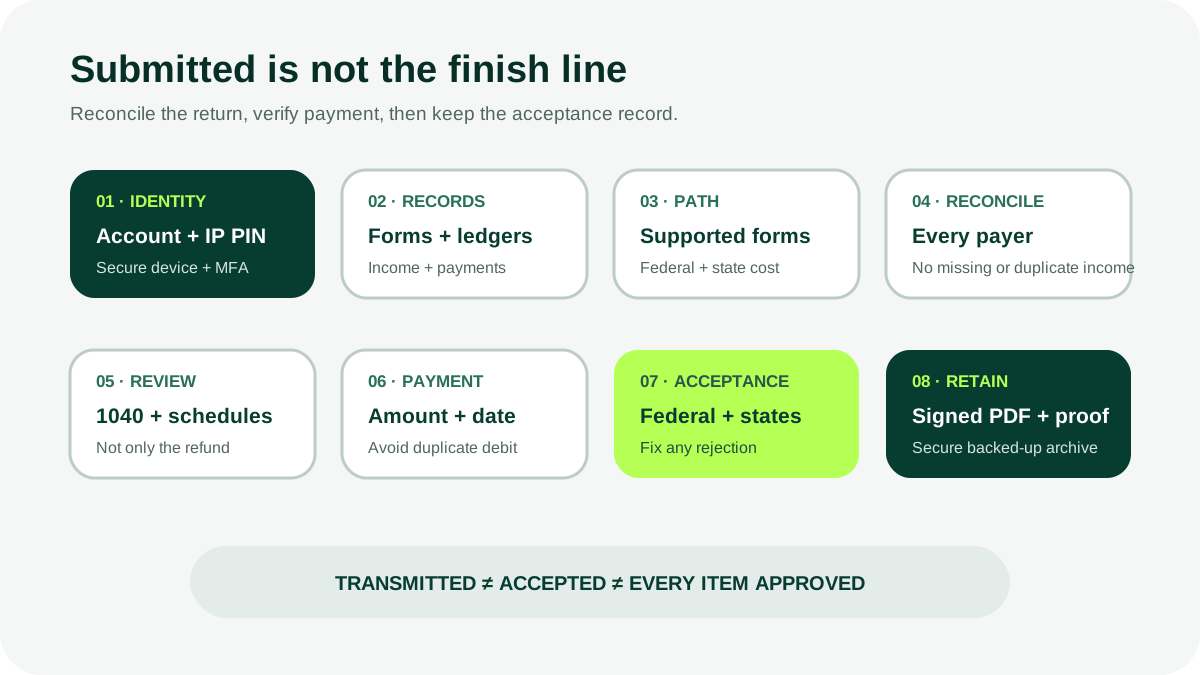
Software can report that the return was transmitted before the IRS accepts it. Monitor federal and each state status. An e-file rejection includes a code or explanation that must be corrected and retransmitted, sometimes by a deadline.
Acceptance means the electronic return passed initial checks; it does not mean the IRS approved every position or released the refund. Processing can be delayed for identity verification, mismatched information, credits, review, or an incomplete return.
Save:
- complete signed federal and state PDF;
- all schedules and worksheets needed to explain figures;
- payment confirmation;
- electronic filing receipt;
- federal and state acceptance confirmations;
- later notices and responses.
Use the official refund-status tool for progress. Do not rely on a refund date estimated by software.
Correct a problem after filing
Not every omission requires immediate amendment; the IRS can correct some math or request information. If income, status, deductions, credits, or tax are materially wrong, review Form 1040-X and state amendment rules for the tax year.
Wait for the original return to process when the instructions recommend it, pay additional tax promptly where appropriate, and preserve a reconciliation from original to amended figures. An amended return does not erase the original filing history.
Know when to use a professional
Consider qualified help for business entities, multi-state work, foreign accounts or income, complex digital assets, equity compensation, rental sales, large casualty loss, adoption, divorce allocation, estate issues, prior-year nonfiling, or a significant notice.
Verify credentials in IRS resources and understand who can represent a taxpayer before the IRS. The taxpayer should still review the forms, ask about uncertain positions, and receive a complete copy before filing.
Bottom line
Online filing is a controlled reconciliation process. Secure identity, collect all records, choose a filing path that supports every form, inspect the actual return, verify payment instructions, and wait for federal and state acceptance. Preserve the signed return and evidence so the filing remains understandable years later.
Related content
Frequently asked questions
Sources
Related content
More from DollarScout on this topic.
