FreeTaxUSA at a glance
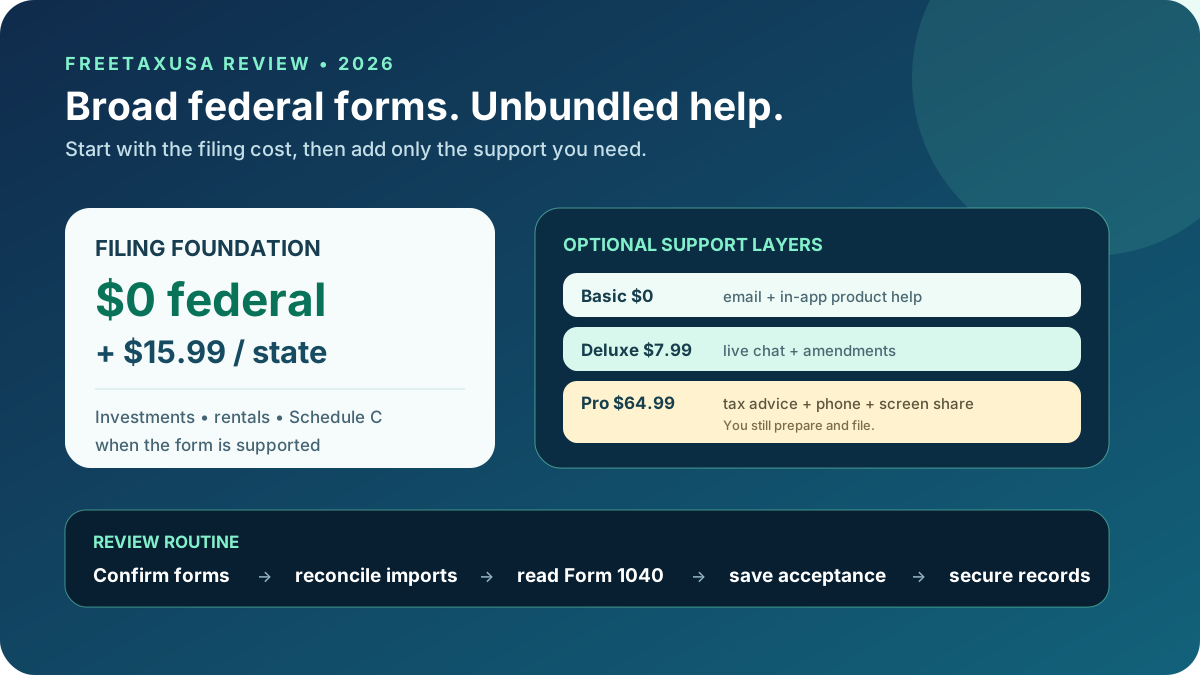
FreeTaxUSA is self-preparation software that charges $0 for supported federal filing and $15.99 for each current-year state return. Unlike many commercial free editions, the free federal product includes a broad set of forms for investments, rental property, itemized deductions, and sole-proprietor income.
Optional support is unbundled: Basic support is free, Deluxe Support costs $7.99, Pro Support costs $64.99, and Audit Defense currently costs $19.99. A confident filer can therefore buy only the help needed.
| Review question | DollarScout finding |
|---|---|
| Best for | Cost-conscious DIY filers comfortable reviewing tax forms |
| Federal price | $0 for all supported current-year federal forms |
| State price | $15.99 per current-year state return |
| Expert help | $64.99 Pro Support for advice, phone, and screen sharing |
| Main limitation | No core prepared-for-you service and less guided explanation |
Federal and state pricing
Price scores 5.0/5. FreeTaxUSA states that federal filing and every supported federal form remain free, whether the return is simple or complex. The current state price is $15.99 per return.
That creates an unusually clear total. One federal and one state return costs $15.99 before optional support. Two states cost $31.98. A filer who adds Deluxe Support pays $23.98 with one state; Pro Support brings that basket to $80.98.
Optional charges matter. The current public table lists $16.98 for an amended return unless included through Deluxe or Pro, $19.99 for Audit Defense, $24.99 to pay filing fees from the refund, and separate prices for prior-year state returns and professional printing. Paying $15.99 by card is cheaper than giving up $24.99 from a refund, assuming the card balance is paid without interest.
Broad supported forms
The free federal product supports common wage, retirement, unemployment, Social Security, interest, dividend, and dependent situations. It also advertises investments, rental property, home sales, itemized deductions, self-employment, Schedule C, K-1, 1120-S information, and more than 350 credits and deductions.
Broad does not mean universal. Review the current supported-form list for foreign reporting, unusual entities, specialized elections, uncommon state forms, and any return requiring professional judgment. Software can support a field without determining whether the underlying position is correct.
Create a form inventory from every payer, brokerage, marketplace, business, property, and state. If one essential schedule is unsupported, discover that before entering the rest of the return.
Interview and ease of use
Ease of Use scores 4.3/5. FreeTaxUSA uses a step-by-step interview and final checks, with plain menus for income, deductions, credits, health care, miscellaneous taxes, payments, and state returns. It is more approachable than entering IRS forms directly.
The workflow is less explanatory than TurboTax or a live professional. A filer who recognizes the difference between a 1099-NEC and 1099-K, understands cost basis, and can reconcile a Schedule C will move quickly. Someone encountering those concepts for the first time may need the help center or professional advice.
Do not judge correctness from the refund meter. Enter all income before evaluating the result, read every diagnostic, and inspect the complete Form 1040 and schedules. Compare adjusted gross income, taxable income, total tax, credits, withholding, estimated payments, and carryovers with source records and the prior year.
Document and prior-year imports
FreeTaxUSA currently supports uploads or photographs for W-2, 1099-R, 1099-MISC, and 1099-NEC, plus PDF uploads for 1099-INT, 1099-DIV, 1099-B, and consolidated 1099 statements. Stock and crypto 1099-B upload can reduce large amounts of manual entry.
New users can import a prior-year PDF from TurboTax, H&R Block, TaxAct, TaxSlayer, Cash App Taxes, or OLT. That import can prefill identity and carryover information.
Every import needs reconciliation. Verify employer and payer identification, state boxes, withholding, retirement distribution codes, capital-gain proceeds, basis, wash sales, and holding periods. Compare loss carryovers, depreciation, dependents, estimated payments, and business data with the signed prior return. A successful upload only proves that a file was read, not that every tax field is complete.
Basic and Deluxe Support
Support scores 4.3/5. Basic support is free through email and the in-app support center. It is appropriate for product navigation, account questions, and ordinary workflow issues, but it is not a promise of personalized tax advice.
Deluxe Support costs $7.99 and adds live chat, priority support, and unlimited amended returns for the applicable return. That is a modest price when a filer expects several workflow questions or wants amendment coverage.
Distinguish a software specialist from a credentialed tax professional. Ask whether the person can interpret the tax issue or only explain where to enter an amount. Save the response and any source cited.
Pro Support
Pro Support costs $64.99 and adds personalized tax advice from a tax professional, phone support, live screen sharing, and chat. It can be valuable when the return is supported but one or two decisions need informed explanation.
The professional does not take over the entire return or sign as preparer. The customer remains responsible for data entry, selections, completeness, and filing. Screen sharing should begin only through the authenticated product; never grant control from an unsolicited call or message.
Prepare questions in advance with the exact document, tax year, jurisdiction, dates, and amounts. A focused consultation is more useful than asking whether the whole return looks right without supplying source records.
Accuracy checks and guarantee
Accuracy Tools scores 4.6/5. FreeTaxUSA runs a final check before filing and states that its formulas and calculations follow federal and state standards. The Calculation Accuracy Guarantee reimburses IRS or state penalties and interest caused by incorrect FreeTaxUSA formulas or calculations, subject to its written conditions.
The guarantee explicitly excludes user-generated errors such as incorrect data entry. It is limited to penalties and interest rather than additional tax or consequential losses, and the customer must notify FreeTaxUSA within the stated period and supply supporting documents.
Resolve all warnings, verify forms against original statements, and preserve the filed return and acceptance. A software calculation guarantee does not validate whether a deduction is substantiated or an omitted document should have been entered.
Maximum Refund Guarantee
Refund Guidance scores 4.5/5. If another filing method produces a larger refund or smaller liability using the same data, FreeTaxUSA's guarantee offers a refund of fees paid and a service code for a free amended return.
The refund or liability difference cannot come from different data, credits, deductions, unlawful positions, or a calculation error in the competing method. The remedy is not the full difference between tax results.
Because federal filing is $0, the monetary fee refund may be only the state and optional purchases. The free amendment code is useful, but the practical value of the guarantee depends on following its evidence and timing requirements.
Audit Defense and notices
Audit Defense currently costs $19.99. It is separate from Basic, Deluxe, Pro Support, and the calculation guarantee. Review the service provider, enrollment deadline, covered notices, years, representation scope, and exclusions before buying.
An IRS letter may be a math adjustment, identity request, income mismatch, payment problem, or audit. Verify it through official IRS channels, note the deadline, and preserve the envelope and complete correspondence. Do not assume a low-cost add-on covers a notice that predates enrollment or a position outside its agreement.
For a substantial dispute, business return, international matter, or possible fraud, independent representation by an enrolled agent, CPA, or tax attorney may be more appropriate.
Security and records
FreeTaxUSA states that it encrypts data, uses secured submissions, maintains physical access controls and monitoring, and meets or exceeds IRS security requirements. Account safety still depends on the customer.
Use a unique password, multifactor authentication, a secured email account, and an IRS Identity Protection PIN when appropriate. Confirm direct-deposit and payment account numbers on the final return. Do not send a return, notice, or verification code through an unexpected message.
Download the signed federal and state returns, worksheets, e-file acknowledgements, and source documents to encrypted storage. Keep records outside the service for the period relevant to the return.
FreeTaxUSA alternatives
Choose Cash App Taxes when a supported federal and state return can both be filed for $0 and no tax-professional help is needed. Choose TaxAct when a more conventional tiered interview or full-service option is worth a higher state price.
H&R Block offers live tax-pro support with paid DIY products and an office network. TurboTax provides the most polished interview and a stronger handoff to expert preparation, but usually at a much higher all-in price.
Eligible taxpayers should also compare IRS Free File, Volunteer Income Tax Assistance, and Tax Counseling for the Elderly. A free program with appropriate personal help can be better than any DIY interface.
Who FreeTaxUSA is best for
FreeTaxUSA fits filers who:
- Are comfortable self-preparing and checking actual tax forms.
- Need investment, rental, itemized, or self-employment schedules.
- Want a transparent $15.99 state price.
- Prefer to buy chat, professional advice, or audit support separately.
- Will reconcile every imported document.
It is weaker for someone who wants a professional to prepare and sign the complete return, or who needs extensive explanations for a first complex filing.
Bottom line
FreeTaxUSA earns 4.6/5. The $0 supported federal return and $15.99 state charge set the strongest price foundation in this group, while broad forms, current import support, sensible optional tiers, and written guarantees make the product more than a bare-bones free tool.
The value assumes an engaged user. Confirm form support, reconcile imports, inspect the completed return, and understand that Pro Support advises rather than prepares. For a disciplined DIY filer, those are reasonable tradeoffs for an exceptionally low total cost.