Many products on this page are from partners who compensate us. This doesn't influence our ratings. Our opinions are our own.
Taxes · Rankings
Best Tax Software for Self-Employed Filers in 2026
By Sophie Brown, Senior Finance Editor
Updated Jul 19, 2026
Fact-checked Jul 19, 2026
14 min read
H&R Block ranks first among the five products in DollarScout's 2026 self-employed tax-software comparison because its $130 Self-Employed Online tier combines Schedule C coverage, business deductions, current live tax-professional help, and a credible path to virtual or office preparation. FreeTaxUSA ranks second and is the best value: supported federal Schedule C filing is $0, states are $15.99, and optional Pro Support is $64.99. TurboTax is third for the most polished business interview, document capture, estimator, and online expert ladder. TaxAct is fourth for a direct $109.99 federal product and strong written guarantee. Cash App Taxes is fifth overall but can be the best $0 option for a supported, well-documented sole proprietor who needs no tax advice.
This page is primarily about individual Form 1040 returns with Schedule C and Schedule SE. A partnership, S corporation, C corporation, multi-member LLC, payroll return, information-return filing obligation, foreign report, or state business return can require different software or a professional engagement. “Self-Employed” on a consumer page does not mean every entity filing is included. DollarScout checked official pricing, forms, support, import, guarantee, recordkeeping, and IRS guidance on July 19, 2026. We did not prepare a live business return, test books or imports, contact an expert, verify deductions, transmit a form, or respond to a notice.
Free Online is $0 for qualifying returns; Deluxe is $65, Premium $105, and Self-Employed $130 for federal online filing under current 2026 pricing
$0 for every supported current-year federal return, including many investment, rental, and self-employment forms that trigger paid upgrades elsewhere
$0 Free Edition for qualifying simple returns; current DIY pricing ranges from $59 to $139, Expert Assist from $79 to $209, and Full Service uses forms-based pricing after its starting offer
Free is $0 for qualifying federal returns; current paid federal prices are $59.99 Deluxe, $99.99 Premier, and $109.99 Self-Employed
$0 for supported current-year federal self-preparation and filing, including many W-2, 1099, investment, crypto, and self-employment situations
State Filing
Free Online includes one qualifying state return at $0; current Deluxe, Premium, and Self-Employed online products list $49 for each state return
$15.99 for each current-year state return; prior-year state returns and optional refund-payment or professional-print services use separate prices
A qualifying Free Edition return includes federal and state filing; paid DIY, Expert Assist, and Full Service list state filing as additional, with the amount determined by product and current checkout terms
Free lists state filing as additional; Deluxe, Premier, and Self-Employed currently list $64.99 for each state return filed
$0 for supported current-year state self-preparation and filing; e-file availability, forms, and filing method depend on the applicable state and return
Support Options
Paid DIY editions include AI Tax Assist and Live Tax Pro Support; separate virtual and office services can prepare a return, but local offices cannot directly access an ordinary DIY Online account
Basic email and in-app support is $0; Deluxe Support is $7.99 with live chat and unlimited amendments, while $64.99 Pro Support adds personalized tax advice, phone access, and live screen sharing
DIY includes guided software and self-help resources; Expert Assist adds unlimited expert advice and a final review, while Expert Full Service assigns an expert to prepare, sign, and file the return
Technical and filing support accompany DIY products; Xpert Assist adds access to credentialed tax experts and a broad final review, while Xpert Full Service prepares and files eligible returns
Cash App offers 24/7 in-app chat and daily phone support for account and product issues, but Cash App Taxes terms exclude tax advice, tax planning, audit assistance, and representation
Standout feature
Schedule C workflow plus included live tax-pro help on paid DIY
$0 supported federal Schedule C and related forms
Excellent Schedule C explanations, imports, and review workflow
Competitive $109.99 federal Schedule C tier
$0 supported federal and state self-employed filing
Detailed reviews
In-depth look at every product on our list.
Best Overall · Editor's Choice
1
Ranked #1
H&R Block
★★★★⯨4.5/54.5
DollarScout rating
HB
H&R Block
Best overall self-employed help
H&R Block ranks first because its $130 federal Self-Employed Online tier plus $49 per state combines Schedule C and related individual forms with current AI and unlimited Live Tax Pro Support. Separate Tax Pro Review, virtual, and office preparation provide an exit from DIY, though each is a distinct engagement with its own price and data handoff.
Free Online is $0 for qualifying returns; Deluxe is $65, Premium $105, and Self-Employed $130 for federal online filing under current 2026 pricing
State Filing
Free Online includes one qualifying state return at $0; current Deluxe, Premium, and Self-Employed online products list $49 for each state return
Support Options
Paid DIY editions include AI Tax Assist and Live Tax Pro Support; separate virtual and office services can prepare a return, but local offices cannot directly access an ordinary DIY Online account
Standout features
Schedule C workflow plus included live tax-pro help on paid DIY
Credible review, virtual, drop-off, and office preparation options
Broad related individual forms for investments and rental activity
DollarScout's take
H&R Block ranks first because its $130 federal Self-Employed Online tier plus $49 per state combines Schedule C and related individual forms with current AI and unlimited Live Tax Pro Support. Separate Tax Pro Review, virtual, and office preparation provide an exit from DIY, though each is a distinct engagement with its own price and data handoff.
Pros
✓Schedule C workflow plus included live tax-pro help on paid DIY
✓Credible review, virtual, drop-off, and office preparation options
✓Broad related individual forms for investments and rental activity
Cons
✗$179 one-state DIY total before optional services
✗Online DIY does not automatically transfer into an office engagement
FreeTaxUSA ranks second and offers the strongest value: supported Schedule C, SE, QBI, depreciation, home-office, investment, rental, and related federal forms cost $0, with each state at $15.99. Pro Support brings a one-state advice basket to $80.98, but the professional advises rather than prepares, audits books, or signs the return.
$0 for every supported current-year federal return, including many investment, rental, and self-employment forms that trigger paid upgrades elsewhere
State Filing
$15.99 for each current-year state return; prior-year state returns and optional refund-payment or professional-print services use separate prices
Support Options
Basic email and in-app support is $0; Deluxe Support is $7.99 with live chat and unlimited amendments, while $64.99 Pro Support adds personalized tax advice, phone access, and live screen sharing
Standout features
$0 supported federal Schedule C and related forms
$15.99 states and transparent $64.99 Pro Support
Expanded W-2, 1099, stock, crypto, and competitor-return imports
DollarScout's take
FreeTaxUSA ranks second and offers the strongest value: supported Schedule C, SE, QBI, depreciation, home-office, investment, rental, and related federal forms cost $0, with each state at $15.99. Pro Support brings a one-state advice basket to $80.98, but the professional advises rather than prepares, audits books, or signs the return.
Pros
✓$0 supported federal Schedule C and related forms
✓$15.99 states and transparent $64.99 Pro Support
✓Expanded W-2, 1099, stock, crypto, and competitor-return imports
Cons
✗Less explanatory for a first-time business return
✗No full-service preparation path in the compared product
TurboTax ranks third for the most polished Schedule C interview, 1099-NEC capture, financial imports, Intuit Assist, CompleteCheck, year-round estimator, and DIY-to-expert ladder. DIY Premium reaches $139 before state and Expert Assist reaches $209, while Full Service is forms-priced. Entity returns use separate products and should not be inferred from the consumer label.
$0 Free Edition for qualifying simple returns; current DIY pricing ranges from $59 to $139, Expert Assist from $79 to $209, and Full Service uses forms-based pricing after its starting offer
State Filing
A qualifying Free Edition return includes federal and state filing; paid DIY, Expert Assist, and Full Service list state filing as additional, with the amount determined by product and current checkout terms
Support Options
DIY includes guided software and self-help resources; Expert Assist adds unlimited expert advice and a final review, while Expert Full Service assigns an expert to prepare, sign, and file the return
Standout features
Excellent Schedule C explanations, imports, and review workflow
On-demand advice and full-preparation options
Useful year-round estimator after eligible self-employed filing
DollarScout's take
TurboTax ranks third for the most polished Schedule C interview, 1099-NEC capture, financial imports, Intuit Assist, CompleteCheck, year-round estimator, and DIY-to-expert ladder. DIY Premium reaches $139 before state and Expert Assist reaches $209, while Full Service is forms-priced. Entity returns use separate products and should not be inferred from the consumer label.
Pros
✓Excellent Schedule C explanations, imports, and review workflow
✓On-demand advice and full-preparation options
✓Useful year-round estimator after eligible self-employed filing
Cons
✗Premium federal, state, and expert pricing
✗Partnership and corporation products are separate from consumer Premium
Our pick for best direct federal-price alternative
4
Ranked #4
TaxAct
★★★★⯨4.3/54.3
DollarScout rating
TAX
TaxAct
Best direct federal-price alternative
TaxAct ranks fourth with a direct $109.99 federal Self-Employed interview, business deductions, imports, alerts, optional $60 Xpert Assist, and a broad written accuracy guarantee. The $64.99 paid-state charge makes a one-state return $174.98 before advice or audit defense, so its federal advantage should be tested against the full jurisdiction basket.
Free is $0 for qualifying federal returns; current paid federal prices are $59.99 Deluxe, $99.99 Premier, and $109.99 Self-Employed
State Filing
Free lists state filing as additional; Deluxe, Premier, and Self-Employed currently list $64.99 for each state return filed
Support Options
Technical and filing support accompany DIY products; Xpert Assist adds access to credentialed tax experts and a broad final review, while Xpert Full Service prepares and files eligible returns
Standout features
Competitive $109.99 federal Schedule C tier
Direct workflow for organized experienced filers
Xpert and full-service escalation plus strong written accuracy remedy
DollarScout's take
TaxAct ranks fourth with a direct $109.99 federal Self-Employed interview, business deductions, imports, alerts, optional $60 Xpert Assist, and a broad written accuracy guarantee. The $64.99 paid-state charge makes a one-state return $174.98 before advice or audit defense, so its federal advantage should be tested against the full jurisdiction basket.
Pros
✓Competitive $109.99 federal Schedule C tier
✓Direct workflow for organized experienced filers
✓Xpert and full-service escalation plus strong written accuracy remedy
Cons
✗$64.99 per state filed on the paid tier
✗Less business guidance than TurboTax and less integrated help than H&R Block
Cash App Taxes ranks fifth for the general self-employed audience but can be first for a confident, well-documented sole proprietor whose forms and state are supported: federal and state filing costs $0. The terms provide no tax advice, planning, professional preparation, audit help, or representation, so uncertain deductions or entity questions require outside expertise.
$0 for supported current-year federal self-preparation and filing, including many W-2, 1099, investment, crypto, and self-employment situations
State Filing
$0 for supported current-year state self-preparation and filing; e-file availability, forms, and filing method depend on the applicable state and return
Support Options
Cash App offers 24/7 in-app chat and daily phone support for account and product issues, but Cash App Taxes terms exclude tax advice, tax planning, audit assistance, and representation
Standout features
$0 supported federal and state self-employed filing
No Schedule C upgrade tier
Phone and desktop access with published security controls
DollarScout's take
Cash App Taxes ranks fifth for the general self-employed audience but can be first for a confident, well-documented sole proprietor whose forms and state are supported: federal and state filing costs $0. The terms provide no tax advice, planning, professional preparation, audit help, or representation, so uncertain deductions or entity questions require outside expertise.
Pros
✓$0 supported federal and state self-employed filing
✓No Schedule C upgrade tier
✓Phone and desktop access with published security controls
Cons
✗No credentialed advice, preparation, or representation
✗Unsupported entity, form, or state situations require another provider
Prices, methodology, tradeoffs, and the workflow each service actually supports.
How we ranked self-employed tax software
The model weights Schedule C and Related Form Fit at 25%, Record and Import Workflow at 20%, Guidance and Expert Access at 20%, All-In Price at 15%, State and Estimated-Tax Workflow at 10%, and Notices, Security, and Data Exit at 10%. We reward a provider that makes income, expenses, assets, vehicle use, home office, health insurance, retirement contributions, and estimated payments reviewable. A deduction finder does not score well if it obscures the ledger or who must substantiate the amount.
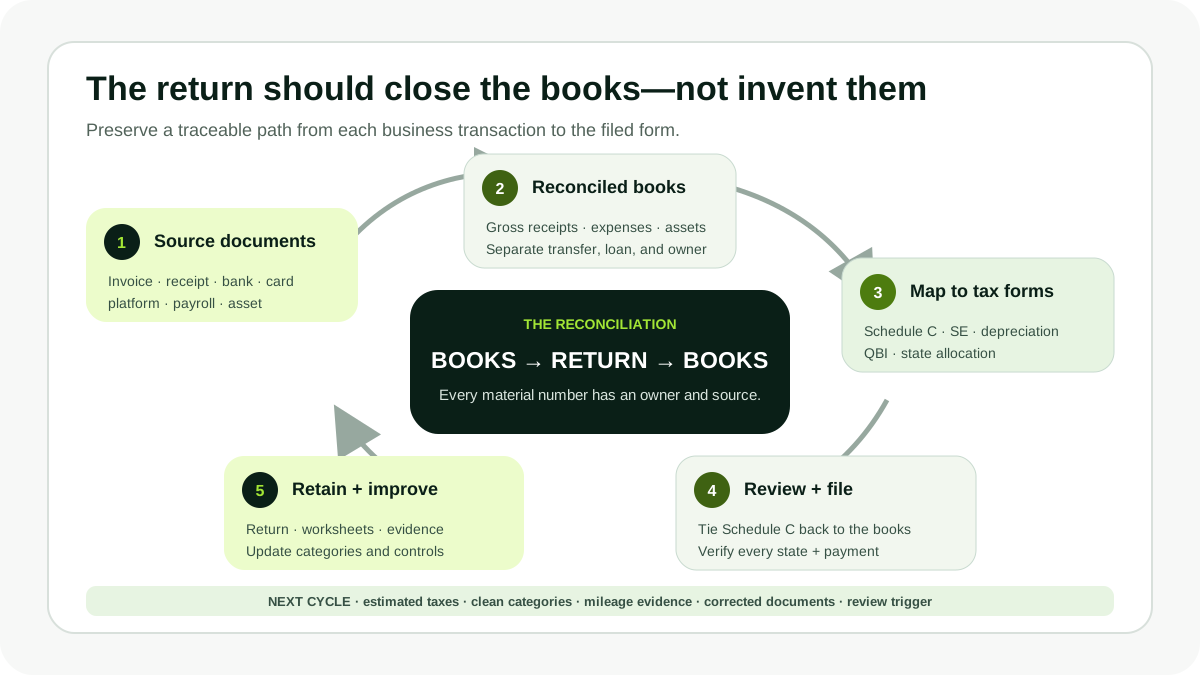
The software should receive reconciled books—not create a business ledger from scattered 1099s. Preserve the evidence trail from transaction to filed form.
1. H&R Block — best overall for self-employed help
H&R Block ranks first because its Self-Employed Online edition costs $130 federal plus $49 per state and currently includes AI Tax Assist and unlimited Live Tax Pro Support. It covers Schedule C business income and deductions on top of Premium's investment, cryptocurrency, rental, and advanced income features. Current supported-form material includes Schedule C, Schedule SE, depreciation, home office, and related individual forms.
The support structure matters more for a sole proprietor than for a basic return. Vehicle deductions, mixed-use assets, inventory, cost of goods sold, home office, startup costs, health insurance, retirement contributions, QBI, contractor payments, and multi-state income can require judgment. Live support can answer questions while the taxpayer self-prepares; it does not change the taxpayer into a professional-preparation client.
H&R Block also offers Tax Pro Review and prepared returns through virtual or office channels. That gives a business owner a practical exit when records or positions outgrow DIY. The channels remain separate. A local office does not automatically see data in an Online DIY account, and moving to a prepared service changes price, document intake, signer, and responsibility. Confirm the handoff before entering the return twice.
The one-state DIY total is $179; two paid states total $228. State obligations can arise from travel, remote work, services performed elsewhere, inventory, or a move. H&R Block wins when included advice and a potential prepared-return path justify that price. It loses value when the books are clean, the Schedule C is routine, and the filer needs only forms that a lower-cost product covers.
Document upload and import reduce typing, but the business return should start from reconciled books. Tie gross receipts to bank, card, platform, cash, invoice, and 1099 records. Tie expenses to receipts and a chart of accounts. Review the final Schedule C line by line and compare Schedule SE, QBI, estimated payments, state allocations, depreciation, and carryovers.
2. FreeTaxUSA — best self-employed value
FreeTaxUSA ranks second because supported self-employed federal filing costs $0. The current form set includes Schedule C and SE, 1099-NEC, MISC, and K, payment-card and third-party sales, QBI, self-employed retirement contributions, depreciation, home office, business credits, farm income, K-1 income, and rental activity. Each state return costs $15.99.
The pricing is unusually transparent. A federal Schedule C and one state cost $15.99. Add Pro Support for $64.99 and the basket is $80.98. Audit Defense is $19.99. Paying from a refund costs $24.99, so a card is normally the lower FreeTaxUSA fee when paid without interest.
FreeTaxUSA now supports W-2 and multiple 1099 imports, including NEC, MISC, B, INT, DIV, R, and consolidated statements. Imports are valuable when a business owner also invests, but a 1099-NEC or 1099-K is not a ledger. A 1099-K can report gross payments before refunds, fees, chargebacks, sales tax, and basis. Business income from customers who issued no form still belongs in the books.
Pro Support provides personalized advice by phone, live chat, or screen share while the customer enters and signs. It does not prepare the books, inspect every receipt, take responsibility for the full return, or sign as paid preparer. Frame questions with the tax year, business activity, document, amount, and jurisdiction, then confirm the final form reflects the answer.
FreeTaxUSA ranks below H&R Block because the interview is less explanatory and there is no full-service preparation path in the compared product. It can rank first for an experienced sole proprietor with reconciled records, a routine Schedule C, and a willingness to consult an independent CPA or enrolled agent for isolated issues.
3. TurboTax — best guided business interview and expert ladder
TurboTax ranks third because Do It Yourself Premium—formerly Self-Employed—combines an accessible Schedule C interview with 1099-NEC capture, document and financial imports, expense categories, asset and vehicle guidance, Intuit Assist, CompleteCheck, and a year-round tax estimator after an eligible self-employed filing. Current DIY pricing reaches $139 before state filing.
Expert Assist Premium reaches $209 plus state and adds on-demand tax-expert advice and a final review while the business owner prepares. Expert Full Service assigns a professional to review documents, prepare, sign, and file, with final price based on actual forms and states after a starting offer. TurboTax Business is a different product for certain entity returns; a consumer Premium page should not be assumed to file an S corporation or partnership return.
The interview helps a first-time freelancer translate records into Schedule C categories. It can explain ordinary versus capital costs, vehicle choices, home office, health insurance, retirement, and QBI. That guidance is useful only after the records are complete. The software cannot know whether a payment was personal, whether an expense is ordinary and necessary, or whether a worker should have been treated as an employee.
Imports demand review. Compare 1099-NEC and 1099-K amounts with gross receipts, inspect missing cost basis on investment statements, confirm estimated payments, and reconcile the final Schedule C to books. Corrected documents or platform summaries can arrive after the initial import.
TurboTax ranks below FreeTaxUSA because the price difference is large for the same supported federal form and below H&R Block because H&R Block's paid DIY support is included under the current offer. It can be the best fit when its explanations, imports, QuickBooks-adjacent ecosystem, or expert ladder genuinely reduce costly confusion.
4. TaxAct — best direct federal-price alternative
TaxAct's Self-Employed edition costs $109.99 federal plus $64.99 per state. It covers freelance and side-gig income, sole proprietors and single-member LLCs filing on Schedule C, investments, rentals, home sales, business income and expenses, and other forms inherited from Premier. The one-state total is $174.98 before expert help or Audit Defense.
The interview is direct and suits a business owner who already has categorized records. Deduction Maximizer, imports, TaxAct Alerts, mobile access, and prior-year continuity support the workflow. It is less explanatory than TurboTax and has a much higher state price than FreeTaxUSA.
Xpert Assist currently costs $60 and provides unlimited contacts with tax experts plus a broad final review for eligible consumer returns. Availability, topics, and appointment capacity are limited, and the review does not mean every source document was audited. The customer remains the preparer and signer. Xpert Full Service is separate and changes scope and price.
TaxAct's $100,000 Accuracy Guarantee can offer a broad remedy for an eligible software error, including software fees, a tax difference determined by the authority, penalties, interest, and documented legal or audit costs up to the cap. It does not cover omitted gross receipts, unsupported expenses, bad books, or incorrect user input.
TaxAct is a credible one-state choice when its direct workflow fits and the user values the guarantee. For two or more paid states, the $64.99 state charge deserves special scrutiny.
5. Cash App Taxes — best $0 supported Schedule C
Cash App Taxes ranks fifth overall because it offers the least professional depth, but its price is unmatched: supported federal and state filing costs $0, including many 1099 and self-employment situations. There is no separate Schedule C tier and no ordinary state fee.
A well-organized contractor with one straightforward business and a supported state can file without giving up part of the economics to software. The product works on phone or computer and publishes encryption, security, and e-file disclosures. Downloading the return outside Cash App creates a durable record.
The written terms draw a hard line. Cash App Taxes does not act as an accountant or tax, legal, or financial adviser, provide planning or structuring, promise audit help, or represent the taxpayer. The user is responsible for the return. Product support is not a substitute for advice about whether an expense is deductible, how to allocate a multi-state service, or whether an entity election is appropriate.
The Maximum Refund Guarantee is federal-only, same-calendar-year, and capped at a $100 gift card. It does not cover state results, prior years, late filings, audit defense, or broad calculation-error losses.
Cash App Taxes can rank first for a confident filer whose return, state, and forms are explicitly supported. It ranks fifth for the general self-employed audience because a complex business, uncertain deduction, entity filing, payroll issue, or notice requires leaving the product for outside expertise.
Self-employed tax software comparison
Product
Federal + one state checked
Best workflow
Expert responsibility
Main constraint
H&R Block Self-Employed
$130 + $49 = $179
Guided Schedule C with included paid-DIY help
Advice in DIY; separate review or preparation
Channels do not automatically share the DIY return
FreeTaxUSA
$0 + $15.99 = $15.99
Reconciled records and value-focused DIY
$64.99 advice; no prepared return
Less hand-holding
TurboTax Premium
Up to $139 + state
Guided interview, imports, estimator
Assist or forms-priced Full Service
Premium total; entity products are separate
TaxAct Self-Employed
$109.99 + $64.99 = $174.98
Direct experienced DIY
$60 Assist; separate Full Service
High paid-state price
Cash App Taxes
$0 supported federal + state
Straightforward supported sole proprietor
Product support only
No tax advice, preparation, or representation
Confirm the return type before choosing consumer software
Schedule C generally reports a business operated as a sole proprietor, including many single-member LLCs that have not elected corporate treatment. The 2025 instructions say separate businesses require separate Schedules C. Schedule SE calculates self-employment tax. Depreciation, home office, vehicle, QBI, excess business loss, health insurance, retirement contributions, and information returns can add forms outside the main schedule.
A partnership generally files Form 1065; an S corporation files Form 1120-S; a C corporation files Form 1120. Owners receive K-1s or wages that then affect the individual return. Payroll and contractor information returns have separate deadlines and e-file rules. Verify that the purchased product covers both the entity and personal return—or price them as separate products.
Reconcile books before importing tax forms
Use a record system that clearly shows income and expenses. Reconcile bank, card, payment processor, platform, invoice, cash, payroll, loan, inventory, and asset accounts. Maintain receipts, invoices, mileage or vehicle evidence, property records, and the business purpose. Separate transfers, owner contributions, draws, loan proceeds, and sales tax from income.
Then reconcile every information return to the books. A 1099-NEC can omit clients below a reporting threshold. A 1099-K can include gross payments rather than profit. Duplicate reporting can occur when a platform transaction also appears on another 1099. The return must report the correct income, not simply the sum of forms.
Map the final profit-and-loss statement to Schedule C and retain the mapping. Round totals only after reconciliation. If the software category differs from the books, document why.
Review deductions as evidence, not prompts
For each material expense, preserve amount, date, payee, business purpose, allocation, and source document. Mixed phone, internet, vehicle, and home costs need a defensible business-use method. Assets may require depreciation or an election rather than an immediate ordinary expense. Inventory and cost of goods sold follow a different flow from operating expenses.
Software prompts can identify a question; they do not prove the answer. Test nearby choices and read the resulting forms. Seek professional advice before relying on a large home-office allocation, worker classification, entity election, foreign information report, multi-state position, or deduction without ordinary records.
Connect the return to estimated taxes and the next year
Self-employed income can create income tax and self-employment tax without employer withholding. Compare total tax, payments, refundable credits, and next-year expectations. Schedule estimated payments through an official IRS or state account when appropriate, and keep confirmation numbers. An extension extends filing time, not the payment deadline.
Export the final return, Schedule C, depreciation schedules, carryovers, worksheets, state allocations, e-file acceptances, and payment evidence. Update bookkeeping categories and quarterly estimates while the filing review is fresh. The best tax software produces a durable closing package, not just an accepted transmission.
Frequently asked questions
What is the best tax software for self-employed filers in 2026?
H&R Block ranks first for an overall workflow combining Schedule C software, current live help on paid DIY, and separate professional-preparation options. FreeTaxUSA is the best value for a confident sole proprietor with clean books.
Can I file self-employment taxes for free?
FreeTaxUSA charges $0 for supported federal Schedule C filing and $15.99 per state. Cash App Taxes charges $0 for supported federal and state filing. IRS Free File partners may also support self-employment for eligible 2025 AGI of $89,000 or less, subject to partner rules.
Does self-employed software file an S corporation return?
Not necessarily. Consumer Self-Employed or Premium products commonly prepare an individual Form 1040 with Schedule C. Partnerships, S corporations, and C corporations use separate entity returns and may require a different product or professional.
Should 1099-K gross payments equal Schedule C profit?
No. A 1099-K generally reports gross payment transactions, not profit after fees, refunds, cost of goods, or expenses. Reconcile it with complete books, report all income, avoid duplicate 1099 reporting, and substantiate deductions.
Is expert assistance the same as bookkeeping or preparation?
No. Advice services answer questions while the customer maintains records and prepares. A final review has a defined scope. Full Service prepares and signs the tax return, but even that does not automatically create or reconcile the underlying books unless the engagement says so.
Our methodology
How we scored every product on this list
Weighted Schedule C/Form Fit 25%, Record/Import Workflow 20%, Guidance/Expert Access 20%, All-In Price 15%, State/Estimated-Tax Workflow 10%, and Notices/Security/Data Exit 10%. We reviewed current documents but did not prepare, import, verify deductions, contact experts, file, or answer a notice.
This review cycle used official product documentation, published methodology, current plan terms, and regulatory sources. Any hands-on or support-response testing is stated explicitly when performed. Read our fullmethodologyfor the complete scoring rubric.
DollarScout uses a privacy-friendly, cookie-less analytics script (Ahrefs) to understand traffic in aggregate. We don't sell your personal information and don't run ad trackers. You can review our Privacy Policy or opt out of data sharing any time.