
TurboTax at a glance
TurboTax is Intuit's online tax-preparation service for self-prepared, expert-assisted, and expert-prepared individual returns. The three service levels use a common interview and document workflow, but they do not have the same price or professional responsibility.
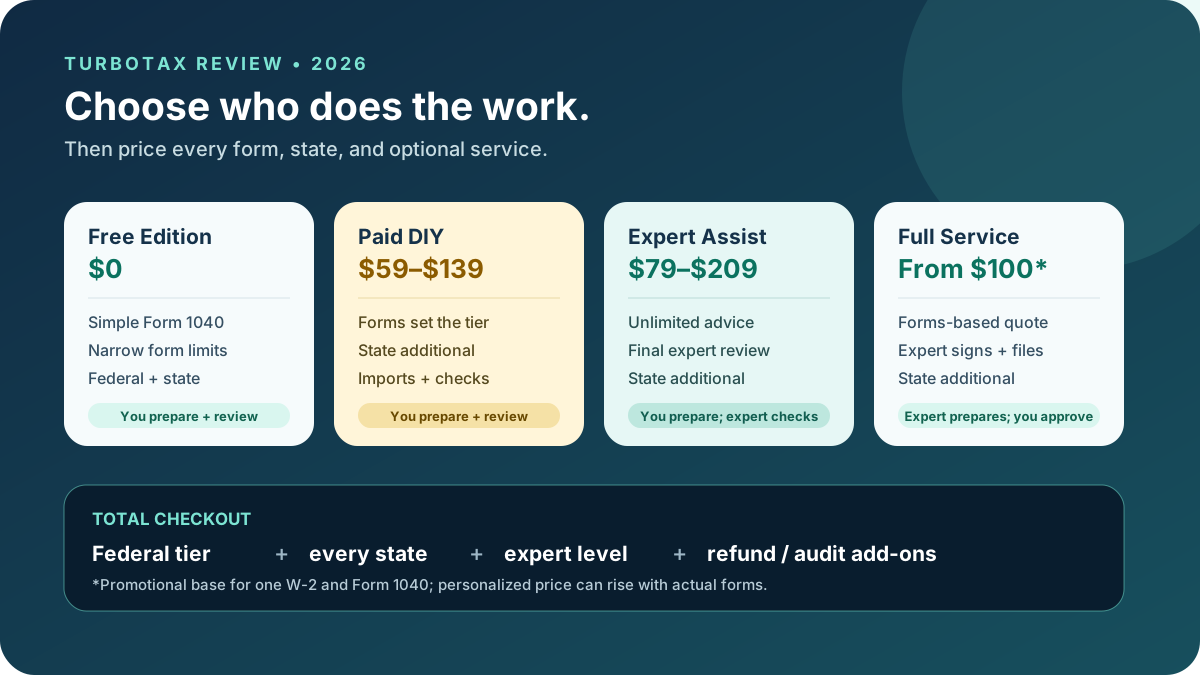
For the 2025 tax return filed in 2026, TurboTax currently displays Do It Yourself from $0 to $139, Expert Assist from $79 to $209, and Expert Full Service with a promotional starting price of $100. State filing is additional on paid products. The final Full Service price depends on the forms and actual situation, and all promotional prices can change.
| Review question | DollarScout finding |
|---|---|
| Best for | Filers who value strong explanations, imports, and expert escalation |
| Free option | Simple Form 1040 returns that meet specific form limits |
| Paid DIY | Currently $59 to $139, plus state filing |
| Expert choices | Assist for advice and final review; Full Service for preparation and filing |
| Main weakness | The final price can rise as forms, states, or service are added |
Free Edition eligibility
Price scores 3.4/5. TurboTax Free Edition is a real $0 federal and state product, but its supported return is narrow. The current disclosure describes a simple Form 1040 with no attached forms or schedules except those needed for the Earned Income Tax Credit, Child Tax Credit, student-loan interest, Schedule 1-A, and certain retirement distributions.
Investment sales, itemized deductions, rental property, self-employment, and other schedules can require an upgrade. Interest and dividend income may qualify only within the stated limits and without Schedule B. TurboTax estimates that about 37% of filers qualify, but that is an eligibility estimate, not a promise about an individual return.
List every expected form before choosing software: W-2, 1099-INT, 1099-DIV, 1099-B, 1099-NEC, 1099-K, K-1, mortgage interest, health-savings-account forms, marketplace insurance, rental income, and state returns. The cheapest product is the one that supports the complete return, not the one with the lowest landing-page number.
Paid DIY pricing
Paid Do It Yourself currently spans $59 to $139 for federal filing on the main product page. State filing is additional. The product selected depends on the tax forms and complexity TurboTax detects, and the price at print or e-file can change without notice.
That model is easy to underestimate. A filer can spend time entering information before learning that an investment sale, self-employment schedule, or rental requires a higher tier. Paying filing fees from the refund can add a separate processing charge; TurboTax currently discloses a $40 refund-processing service fee where offered. Audit Defense and other optional products can also add cost.
Compare the final basket: federal product, every state return, expert service, refund-payment fee, and optional audit representation. A single federal price is not an all-in quote.
Expert Assist and Full Service
Expert Assist currently ranges from $79 to $209 before state filing. The filer still enters and owns the return, while credentialed experts provide on-demand advice and perform a final review. TurboTax says those experts average 12 years of experience. Availability, topics, and the exact expert can vary.
Expert Full Service transfers preparation to a matched expert who reviews documents, prepares the return, confirms a personalized forms-based price, signs as preparer, and files after approval. The displayed $100 starting promotion includes a base W-2 and Form 1040; additional forms and states can raise the final total.
The difference matters. Assist is not the same as handing off a return, and a final review does not eliminate the taxpayer's duty to provide complete information. Full Service offers more responsibility and convenience, but it is not an unlimited flat-price engagement. Ask what forms, state returns, amendments, year-round questions, and notices are included before authorizing work.
Interview and explanations
Ease of Use scores 4.9/5. TurboTax's major strength is translating forms into an interview. The workflow groups income, deductions, credits, investments, property, and business activity into recognizable questions rather than requiring the filer to know every schedule first.
Contextual explanations, progress indicators, prior-year carryover, and search reduce friction. Intuit Assist can answer questions inside the workflow, while CompleteCheck scans for missing information and calculation problems before filing.
The polished interview can also obscure the underlying return. A user should open the forms view or final PDF and reconcile wages, withholding, estimated payments, investment basis, business income, deductions, credits, bank information, and each state. Convenience is a control only when the taxpayer still reviews the output.
Imports and document handling
TurboTax supports photographed or uploaded tax documents and direct imports from participating employers and financial institutions. Imports can save time for W-2s and large investment statements, but they are not proof that every field is correct.
Check taxpayer names, Social Security numbers, box codes, federal and state withholding, cost basis, wash-sale adjustments, and acquisition dates. A 1099-B marked with missing basis can produce a dramatically wrong result if the filer assumes the imported value is complete.
Keep the original document beside the imported screen and reconcile totals before moving on. For a brokerage consolidated statement, compare the final imported capital-gain summary with the statement and confirm any subsequent corrected 1099.
Accuracy tools and guarantees
Accuracy Tools scores 4.8/5. CompleteCheck reviews the return for errors and missing data, and the software performs the arithmetic. TurboTax's 100% Accurate Calculations Guarantee says it will pay IRS or state penalties and interest caused by a TurboTax calculation error, subject to the terms. The taxpayer remains responsible for additional tax due and for errors in information supplied.
The Tax Return Lifetime Guarantee combines accurate calculations, maximum refund, and audit-support coverage for the seven-year life TurboTax defines for an individual return. That language is useful, but each component has separate conditions.
No software can verify income that was never entered or decide whether an unsupported legal position is appropriate. Cross-check the return against IRS transcripts where useful, resolve every program warning, and seek qualified advice for uncertain ownership, residency, basis, entity, foreign reporting, or multi-state questions.
Maximum refund guarantee
Refund Guidance scores 4.6/5. TurboTax searches for deductions and credits and compares information within its interview. The written Maximum Refund Guarantee generally refunds the applicable TurboTax federal and/or state purchase price if another preparation method produces a larger refund or smaller tax due through an amended return under the terms. A Free Edition customer may qualify for a stated $30 payment.
The remedy is usually the software price, not the difference between the two tax results. The comparison must use eligible information and follow the claim process. A larger refund is not automatically better if it comes from incorrect withholding, an unsupported credit, or an omitted liability.
The proper objective is the lowest lawful tax and an accurate return, not the largest displayed refund counter. Adjusting withholding to receive less money back can be financially sensible even though the software's refund number falls.
Audit support versus representation
Support scores 4.8/5 because TurboTax offers self-help, community resources, product support, expert advice, Full Service, and year-round tax professionals depending on service. Its Audit Support Guarantee provides informational question-and-answer help and guidance responding to an eligible letter.
That support does not represent the taxpayer before the IRS or state authority and does not provide legal advice. TurboTax sells Audit Defense separately for representation. If a notice arrives, verify it in the IRS account, read the response deadline, gather the filed return and source records, and identify whether the issue is math, missing information, identity, correspondence examination, or a broader audit.
Never upload a notice or identity document from a link in an unexpected message. Use the authenticated TurboTax account and official IRS channels.
Security and identity controls
TurboTax documents masked Social Security numbers for experts, encryption in transit, account monitoring, and biometric support on capable mobile devices. Strong controls do not remove account-takeover or phishing risk.
Use a unique password, enable multifactor authentication, secure the email account connected to Intuit, and obtain an IRS Identity Protection PIN if appropriate. Store the final return and supporting records in encrypted storage rather than an ordinary email inbox.
Check the routing and account numbers used for a refund or payment. Anyone who asks for an IP PIN, verification code, remote-screen access, or payment through gift cards should be treated as hostile until independently verified.
TurboTax alternatives
Choose H&R Block when access to local offices and included live tax-pro help on paid DIY tiers is a priority. Choose FreeTaxUSA when broad federal form support at $0 and a low fixed state price matter more than a highly polished interview.
TaxAct can be a middle ground for a filer who wants conventional tiered software at lower headline federal prices. Cash App Taxes can be compelling for a supported return at $0, but it lacks TurboTax's professional-assistance ladder and audit representation.
Eligible filers should also check IRS Free File through the IRS website. Entering through the IRS program is different from arriving at a provider's ordinary commercial free page.
Who TurboTax is best for
TurboTax fits filers who:
- Need clear explanations across investments, property, or self-employment.
- Value broad document imports and a guided review process.
- Want the option to add advice or hand the return to an expert.
- Will verify the complete checkout price before filing.
- Understand the difference between audit guidance and representation.
It is less compelling for a confident DIY filer whose forms are supported by a genuinely free federal product, or for a price-sensitive household filing several paid state returns.
Bottom line
TurboTax earns 4.4/5. Its near-leading Ease, Accuracy Tools, Support, and Refund Guidance scores are supported by a coherent workflow, strong import options, error checks, and meaningful expert choices.
Price keeps it from ranking higher. Free Edition is limited, state filing is additional on paid products, and the final cost can expand with forms and service. Inventory the entire return, compare the all-in price, review every imported figure, and select Expert Assist or Full Service because the help is genuinely needed—not because the upgrade appeared late in the interview.