TurboTax vs FreeTaxUSA: 2026 Tax Software Comparison


FreeTaxUSA wins overall at 4.6/5 versus TurboTax at 4.4/5 for a confident self-preparer. It charges $0 for supported federal filing, $15.99 per current-year state return, and keeps chat, professional advice, and Audit Defense optional. TurboTax has the better interview, document workflow, accuracy tools, and path to expert preparation, but paid DIY currently reaches $139 before state filing. Choose FreeTaxUSA to minimize a complex DIY return’s cost; choose TurboTax when stronger explanations, imports, or professional escalation are worth materially more.
Head-to-head
| Feature | TurboTax | FreeTaxUSA |
|---|---|---|
| DollarScout Rating | 4.4/5 ★ | 4.6/5 ★ |
| Federal Filing | $0 Free Edition for qualifying simple returns; current DIY pricing ranges from $59 to $139, Expert Assist from $79 to $209, and Full Service uses forms-based pricing after its starting offer | $0 for every supported current-year federal return, including many investment, rental, and self-employment forms that trigger paid upgrades elsewhere |
| State Filing | A qualifying Free Edition return includes federal and state filing; paid DIY, Expert Assist, and Full Service list state filing as additional, with the amount determined by product and current checkout terms | $15.99 for each current-year state return; prior-year state returns and optional refund-payment or professional-print services use separate prices |
| Support Options | DIY includes guided software and self-help resources; Expert Assist adds unlimited expert advice and a final review, while Expert Full Service assigns an expert to prepare, sign, and file the return | Basic email and in-app support is $0; Deluxe Support is $7.99 with live chat and unlimited amendments, while $64.99 Pro Support adds personalized tax advice, phone access, and live screen sharing |
Category-by-category breakdown
Price
Winner: FreeTaxUSAEase of Use
Winner: TurboTaxAccuracy Tools
Winner: TurboTaxSupport
Winner: TurboTaxRefund Guidance
Winner: TurboTaxDetailed analysis
The short answer
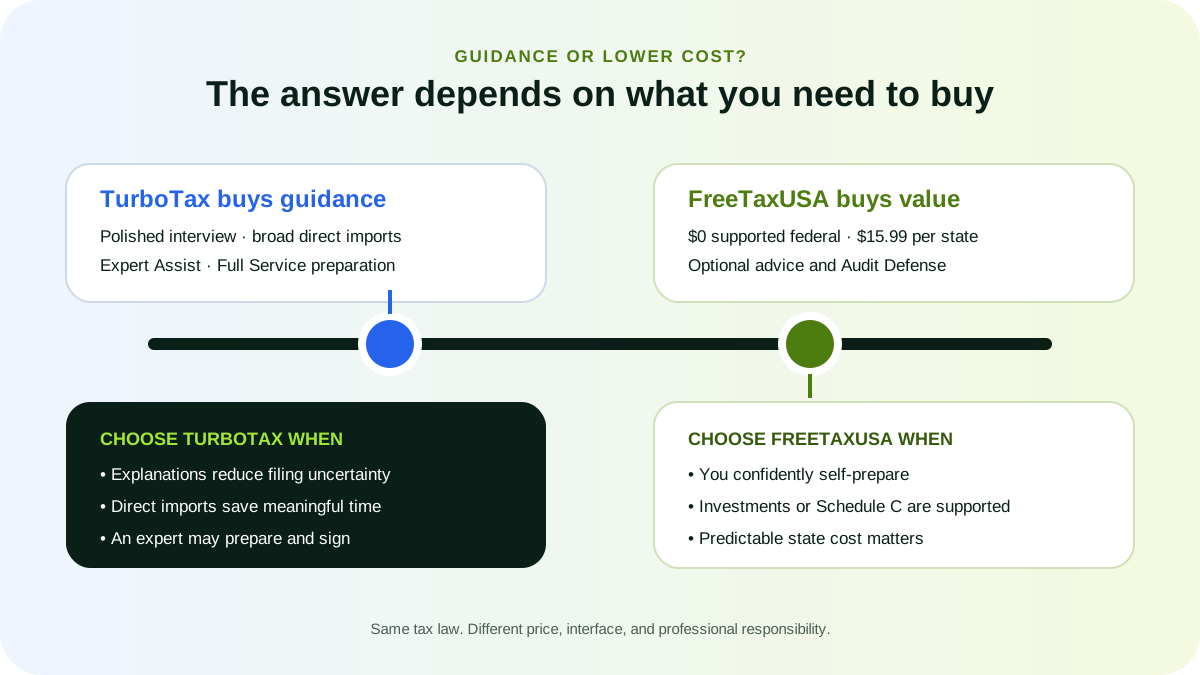
FreeTaxUSA is the value winner; TurboTax is the guidance winner. DollarScout rates FreeTaxUSA 4.6/5 and TurboTax 4.4/5. FreeTaxUSA earns a 5.0/5 Price score because every supported current-year federal return is $0 and each state return is $15.99. TurboTax earns 3.4/5 for Price but leads Ease of Use and Accuracy Tools.
This matchup is most meaningful for someone who can legally self-prepare. TurboTax also offers Expert Assist and Expert Full Service, while FreeTaxUSA Pro Support advises the customer but does not prepare or sign the complete return.
| Decision factor | TurboTax | FreeTaxUSA |
|---|---|---|
| Overall DollarScout rating | 4.4/5 | 4.6/5 |
| Supported federal filing | $0 only for qualifying simple returns; paid DIY $59 to $139 | $0 across broad supported forms |
| Current-year state | Included for qualifying Free Edition; additional on paid products | $15.99 per state |
| Professional advice | Expert Assist, currently $79 to $209 before state | Pro Support, currently $64.99 |
| Full preparation | Expert Full Service, forms-based pricing | Not offered by the ordinary product |
| Audit representation | Optional Audit Defense | Optional Audit Defense, currently $19.99 |
Why FreeTaxUSA can file advanced federal forms for $0
FreeTaxUSA does not use federal form complexity as its main upgrade ladder. Its supported federal product includes wages, retirement, unemployment, Social Security, investments, itemized deductions, a home sale, rental property, Schedule C self-employment, K-1 information, and hundreds of credits and deductions.
The company makes money primarily from state returns and optional services. Current published pricing is $15.99 per state, $7.99 for Deluxe Support, $64.99 for Pro Support, and $19.99 for Audit Defense. Paying filing fees from a refund costs $24.99; paying by card is listed as free.
The model does not mean every federal or state situation is supported. Unusual entity returns, international disclosures, local taxes, specialized elections, or particular state combinations may require another tool or professional. Check the current form list before entering data.
TurboTax free and paid pricing
TurboTax Free Edition includes federal and state filing for a qualifying simple Form 1040. Its current limits exclude most attached forms and schedules, with stated exceptions for the Earned Income Tax Credit, Child Tax Credit, student-loan interest, Schedule 1-A, and certain retirement distributions. Investment sales, itemized deductions, rental activity, and self-employment generally require a paid product.
TurboTax currently advertises paid DIY from $59 to $139 and Expert Assist from $79 to $209, with state filing additional. Expert Full Service starts at a promotional $100 for a base W-2 and Form 1040, then uses forms-based pricing. Prices can change at print or e-file.
A filer with a 1099-B, Schedule C, and two state returns may therefore see a large gap. FreeTaxUSA's core filing cost would be $31.98 for two states; TurboTax's final basket depends on the required paid edition and state charges. Optional advice changes the calculation again.
Interview quality and explanations
TurboTax wins Ease of Use, 4.9/5 to FreeTaxUSA's 4.3/5. TurboTax turns tax concepts into a highly polished interview with contextual explanations, Intuit Assist, progress cues, and strong navigation. It is especially helpful when the filer does not know how a document maps to a schedule.
FreeTaxUSA uses a straightforward interview and provides explanations, but it expects more active review of tax forms. The interface is functional rather than luxurious. That is reasonable for an experienced self-preparer and a real tradeoff for a first complex return.
Ease should not be confused with accuracy. A friendly question can still be answered incorrectly, and a dense screen can still produce a correct return. On either platform, inspect adjusted gross income, taxable income, credits, withholding, estimated payments, direct deposit, and every state allocation on the final forms.
Imports and switching
TurboTax supports direct imports from many employers and financial institutions plus photographed or uploaded documents. That can materially reduce typing for W-2s, 1099s, and brokerage statements.
FreeTaxUSA now supports uploads for common W-2 and 1099 documents, including investment statements, and can import a prior-year PDF from TurboTax, H&R Block, TaxAct, TaxSlayer, Cash App Taxes, or OLT. A competitor-return import can prefill identity and carryover information, which lowers switching friction.
Neither import is authoritative. Reconcile taxpayer identification, withholding, cost basis, wash sales, dates, state fields, foreign tax, and corrected forms. A brokerage PDF with missing basis remains incomplete after software reads it.
Accuracy tools and written guarantees
TurboTax scores 4.8/5 for Accuracy Tools; FreeTaxUSA scores 4.6/5. TurboTax CompleteCheck reviews missing information and calculation issues before filing. FreeTaxUSA performs final checks and publishes a Calculation Accuracy Guarantee.
Both providers describe reimbursement of qualifying penalties and interest caused by their calculation errors, subject to written conditions. They do not generally absorb additional tax, customer entry errors, omitted documents, ignored warnings, or unsupported positions.
The software cannot know about income the customer never entered. Build a document checklist, reconcile imports, resolve warnings, review the actual return, and retain source records. Seek qualified advice when the issue is legal judgment rather than arithmetic.
Tax advice versus full preparation
TurboTax Expert Assist provides on-demand expert advice and a final review while the customer prepares the return. Expert Full Service assigns an expert to prepare, sign, and file after the customer approves the forms-based price and completed work.
FreeTaxUSA Pro Support currently costs $64.99 and offers personalized tax advice, telephone access, and screen sharing. The taxpayer remains the preparer and signs the return. Deluxe Support adds priority chat and other help for $7.99, but it is not professional preparation.
Choose the responsibility level before comparing prices. Someone who needs a preparer to gather documents, make tax judgments, sign the return, and handle a complex state allocation should not treat Pro Support as a substitute for Full Service or an independent professional.
State returns and multi-state households
FreeTaxUSA's $15.99 state price is one of its clearest advantages. One state costs $15.99; three supported state returns cost $47.97 before optional services. The federal return remains $0.
TurboTax includes state filing for an eligible Free Edition return but charges extra on paid products. The exact amount appears with the selected service and checkout terms. A multi-state filer must compare the complete basket, not the federal edition name.
Price is only useful if the state workflow supports residency dates, credits for tax paid to another state, local requirements, business allocations, and the applicable forms. Review each completed state return separately; a correct federal return does not guarantee a correct allocation.
Amendments and prior-year filing
FreeTaxUSA lists current-year amended returns at $16.98, prior-year federal returns at $0, prior-year state returns at $17.99, and prior-year amended returns at $17.97. Prior-year returns generally need to be printed and mailed under the applicable support rules.
TurboTax offers amendment workflows and sells prior-year desktop products. Expert Full Service has separate 2025 amendment timing and terms. Availability, e-file eligibility, professional involvement, and price depend on the year and service.
If the task is an old unfiled return rather than a current-year return, compare that exact year. Preserve mailing proof, payment evidence, transcripts, and the signed return.
Maximum refund guarantees
TurboTax scores 4.6/5 and FreeTaxUSA 4.5/5 for Refund Guidance. Each searches for deductions and credits and publishes a maximum-refund remedy.
TurboTax generally refunds the applicable software purchase price when an eligible amended return prepared another way produces a larger refund or smaller tax due. FreeTaxUSA generally refunds fees paid and provides a code for a free amended return when the written conditions are met.
Neither normally promises to pay the full difference between outcomes. A larger refund can be wrong if it comes from omitted income or an unsupported credit. The correct target is the lowest lawful liability using complete facts.
Audit help and notices
TurboTax includes informational Audit Support and sells Audit Defense separately. FreeTaxUSA offers Audit Defense as an optional $19.99 product under its own terms. Product support, audit education, and representation are different services.
When a notice arrives, verify it through an official IRS or state channel, identify the deadline, and preserve the return, e-file acceptance, source documents, and payment history. Confirm whether the purchased service covers this notice and year. An enrolled agent, CPA, or tax attorney may be appropriate for representation.
Security and data portability
Both platforms describe encryption and security controls. Use a unique password, multifactor authentication, a secured email account, and an IRS Identity Protection PIN where appropriate. Never share a verification code or IP PIN with an unsolicited contact.
Check direct-deposit and payment details on the signed return. Download federal and state forms, worksheets, e-file acknowledgements, and receipts to encrypted storage. Data portability matters when switching providers, amending later, or responding to a notice.
Which one should you choose?
Choose FreeTaxUSA when you understand the return well enough to self-prepare, need investments, rental, itemization, or Schedule C, and want a predictable low state price. It is also strong when advice should be purchased separately rather than bundled into a paid federal tier.
Choose TurboTax when guidance, direct imports, CompleteCheck, and the ability to escalate into expert review or complete preparation are worth the additional cost. The premium can be rational for a first complex return or a document-heavy workflow.
Choose neither when IRS Free File, VITA, TCE, or an independent credentialed preparer offers a better combination of cost and responsibility.
Final verdict
FreeTaxUSA wins for most confident DIY filers because its broad $0 federal product and $15.99 state price are unusually transparent. TurboTax wins when software guidance or professional escalation is the product the customer is actually buying. Decide which problem needs solving before comparing the checkout totals.
Which one is right for you?
- Best for Lowest cost for supported investment or self-employment filing: FreeTaxUSAStart Filing
- Best for Transparent pricing for multiple state returns: FreeTaxUSAStart Filing
- Best for Most guided interview and broad direct imports: TurboTaxStart Filing
- Best for Expert review or complete professional preparation: TurboTaxStart Filing
Final verdict
FreeTaxUSA is the better 2026 choice for an engaged DIY filer who wants broad federal form support at $0 and a predictable $15.99 state price. TurboTax is better when its polished interview, imports, CompleteCheck, Expert Assist, or Full Service materially reduces complexity. Compare the complete form, state, support, and responsibility basket before filing.
Frequently asked questions
Sources and verification
Scores and product facts come from the underlying DollarScout reviews and were checked against official provider documentation and regulatory resources on Jul 18, 2026.
- 1TurboTax Online products and pricing (opens in a new tab)
- 2TurboTax Free Edition eligibility (opens in a new tab)
- 3TurboTax Online product comparison (opens in a new tab)
- 4TurboTax guarantees (opens in a new tab)
- 5FreeTaxUSA pricing (opens in a new tab)
- 6FreeTaxUSA software and imports (opens in a new tab)
- 7FreeTaxUSA supported forms and switching (opens in a new tab)
- 8FreeTaxUSA support tiers (opens in a new tab)
- 9FreeTaxUSA Maximum Refund Guarantee (opens in a new tab)
- 10FreeTaxUSA document import guide (opens in a new tab)
- 11IRS Free File (opens in a new tab)
- 12IRS free tax return preparation (opens in a new tab)
Related content
More from DollarScout on this topic.
