Rocket Money at a glance
Rocket Money is a personal-finance app built around recurring-charge visibility, spending summaries, budgets, alerts, and optional human services. It can detect subscriptions from linked transactions, help Premium members request cancellations, and offer bill negotiation for eligible cable, internet, phone, or security services. Premium expands the app into net-worth tracking, goals, advanced transaction management, full credit reports, account sharing, and web access.
The product deserves two separate price decisions. First, does Premium justify a recurring subscription? Second, does a specific bill negotiation justify surrendering 35%–60% of the first year’s calculated savings? A user can answer yes to one and no to the other.
| Review question | DollarScout finding |
|---|---|
| Best for | Subscription discovery, cancellation assistance, and bill cleanup |
| Free access | Core linking, balance alerts, subscription management, and spending on mobile |
| Premium | Typically $7–$14 per month after a seven-day trial |
| Bill negotiation | 35%–60% of first-year savings when successful |
| Main limitation | Full desktop use and many planning tools require Premium |
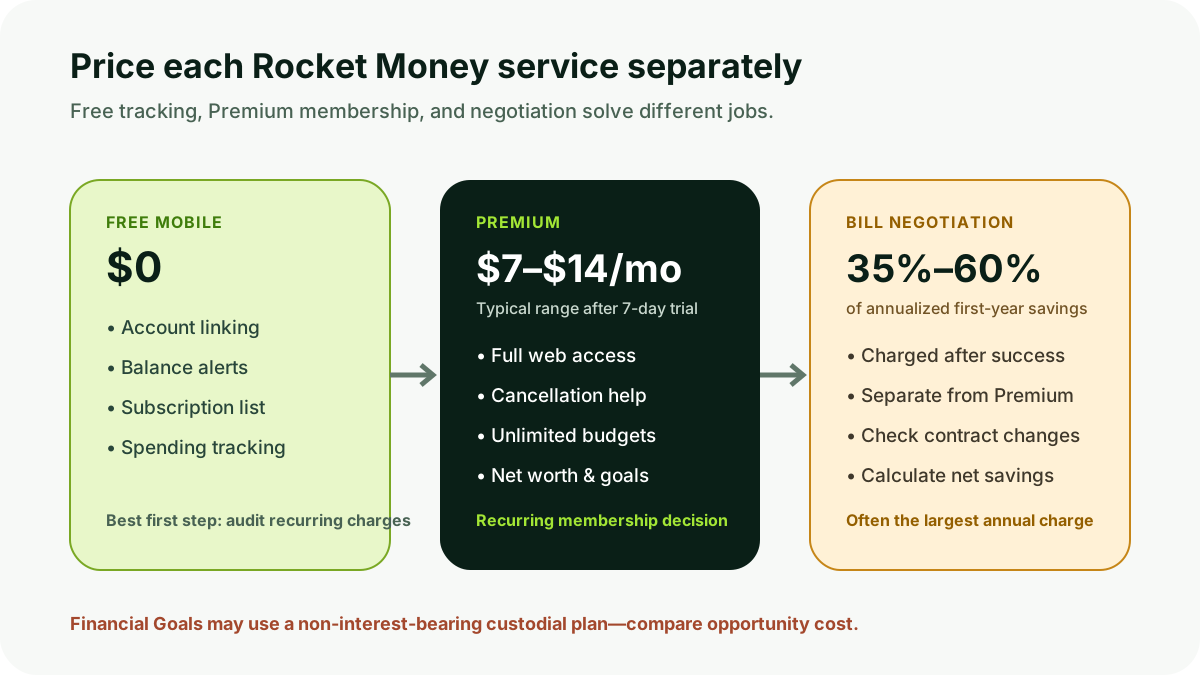
Free versus Premium
Value scores 4.1/5. Rocket Money’s free mobile experience includes account linking, balance alerts, recurring-charge detection, and spending tracking. It can provide immediate value to someone who simply wants a consolidated list of subscriptions and bills.
Premium uses a choose-your-price model. Rocket Money’s January 2026 pricing explanation says the typical range is $7–$14 per month, subject to change, after a seven-day trial. The selected amount continues after trial until changed or canceled. Current help documentation allows users to adjust the monthly price or cancel from the app or website.
Premium adds unlimited custom budgets and categories, transaction rules, tags, splits, notes, manual entries, exports, net worth, full Experian credit reports, balance alerts, a customizable dashboard, account sharing, subscription cancellation assistance, Financial Goals, real-time syncing, and full desktop access. Not every household needs that bundle.
Free users can identify subscriptions but generally handle cancellation themselves. Premium lets Rocket Money attempt cancellation for supported services. A cancellation request can take time and is not a guarantee that a merchant will refund prior charges. Confirm the final status directly with the provider and watch the next statement.
Bill negotiation fee
Rocket Money’s bill-negotiation team contacts eligible providers to seek promotions, discounts, or credits. If no savings are achieved, the negotiation fee is not charged. If successful, Rocket Money charges 35%–60% of the annualized first-year savings, with the user selecting a percentage within the offered range.
The arithmetic matters. If a bill falls by $30 per month, first-year savings are $360. A 35% fee is $126; a 60% fee is $216. The first-year net benefit before taxes or secondary effects is therefore $234 or $144. If the lower price lasts only part of the year or comes with a contract extension, plan change, lost feature, or new expiration date, the practical benefit can differ from the annualized headline.
Read the negotiated terms before approval where the workflow permits. Ask whether the service level changes, whether a promotional clock restarts, whether autopay or paperless billing is required, and when the provider can raise the bill again. A lower monthly number is not automatically a better contract.
Bill negotiation is available separately from Premium. Do not count the success fee as part of the $7–$14 subscription. It can be the largest Rocket Money charge in a year.
Subscription tracking and cancellation
Features earns 4.3/5. Rocket Money scans linked transactions for recurring patterns and gathers them into a subscription view. That can expose forgotten trials, duplicated services, annual renewals, and price increases. The tool is valuable even when a user never delegates a cancellation.
Detection can miss charges with inconsistent merchant names, payments routed through Apple or Google, annual transactions outside the imported history, or subscriptions billed to an unlinked account. It can also classify recurring necessities as subscriptions. Review the list against card statements and app-store subscription pages.
Premium cancellation assistance reduces the work of navigating some providers. It does not transfer legal responsibility for the account. A user should save confirmation, verify the service end date, inspect final bills, and remove payment authorization where appropriate. Canceling through Rocket Money may not resolve equipment returns, early-termination fees, stored credits, or a family member’s access.
Budgeting and transaction tools
The free tier offers basic spending and budget visibility. Premium adds unlimited custom categories and budgets, automated rules, tags, transaction splits, notes, manual transactions, and exports. Those tools can support a detailed review, although Rocket Money’s product identity remains closer to financial cleanup and monitoring than YNAB’s prospective allocation method.
Rules and categories need maintenance. Transfers, credit-card payments, refunds, reimbursements, and split purchases can distort income or spending when misclassified. Real-time syncing reduces waiting after Rocket Money receives new data; it cannot force a bank or Plaid to supply information that is delayed or unavailable.
Net-worth tracking combines linked and manual assets and debts. It is useful for direction, not brokerage-grade performance or tax accounting. Manual assets should use conservative values and a consistent update schedule.
Financial Goals and savings custody
Premium Financial Goals support Smart Savings or a custom monthly amount. Rocket Money’s help center says transferred funds enter a non-interest-bearing custodial plan established at an FDIC-insured financial institution. This is materially different from a competitive high-yield savings account.
Users should read the custody, withdrawal, insurance, and transfer terms before enabling automatic movement. FDIC coverage depends on legal account structure and aggregate deposits at the receiving bank. “At an FDIC-insured institution” does not mean every balance in the app is a bank deposit or that insurance is unlimited.
The opportunity cost of zero interest matters for large or long-held balances. A $5,000 emergency fund earning no interest gives up roughly $200 annually when an alternative pays 4%, before compounding and taxes. Automation can still be worthwhile for a short-term behavioral goal, but the custody account should be compared with an insured savings account that also supports recurring transfers.
Account linking and refreshes
Account Syncing scores 4.1/5. Rocket Money uses Plaid to link checking, savings, cards, and investments. Coverage is broad, but one provider means there is no in-app option comparable to Monarch’s Plaid/MX/Finicity switching when a connection performs poorly.
Institution authentication, multi-factor prompts, pending transactions, and unsupported account types can interrupt updates. Premium advertises real-time syncing, meaning Rocket Money refreshes as new linked data is available. It should not be interpreted as a guarantee of live bank balances.
Connect the cards carrying recurring charges and the accounts relevant to budgeting. Linking every account increases data exposure and cleanup without necessarily improving a subscription audit. Remove dormant connections and verify alerts at the financial institution itself.
Platforms and desktop restriction
Ease of Use earns 4.5/5. The mobile apps present subscriptions, bills, spending, budgets, and savings opportunities in an accessible workflow. Rocket Money’s April 2026 help page says the full desktop experience is now exclusive to Premium. Free members retain their mobile features and limited web settings for profile, connections, and notifications.
That distinction makes “web, iOS, and Android” an incomplete platform description. A person who needs a large-screen budgeting workflow must include Premium in the price. Mobile-only free access remains enough for a recurring-charge audit.
Credit reports and support
Premium includes an Experian credit report using the FICO 2 model, according to Rocket Money’s feature documentation. Lenders can use different bureaus and scoring models. A displayed score is educational and may not match the number used for a mortgage, card, or auto application.
Customer Service scores 3.9/5. Rocket Money offers in-app help, email support, cancellation assistance, and negotiation staff. The lower score reflects service complexity: a subscription cancellation or negotiation can depend on a third-party provider, and a customer may need to verify the outcome independently.
DollarScout did not initiate a negotiation or support case. The score evaluates published channels and the number of handoffs, not an asserted average response time.
Privacy and security
Rocket Money says it uses 256-bit encryption and Plaid for connections and does not store banking credentials on its own servers. Users should read Rocket Money’s privacy notice and Plaid’s authorization disclosure because linked transaction, balance, and account data are sensitive.
Protect the Rocket Money login and recovery email, remove old shared-account members, and store exported data securely. Subscription detection requires transaction access; minimizing linked accounts reduces the amount of financial history consolidated in one place.
Alternatives
Choose PocketGuard when a daily leftover number, category budgeting, and debt avalanche or snowball plan matter more than negotiation. Choose Monarch Money for comprehensive household collaboration, reports, investments, and three connection providers. Choose YNAB for prospective category allocation and a method-centered weekly routine.
Rocket Money is distinctive when the immediate job is reducing billing clutter. A broader planning app is a better fit once subscriptions are clean and long-term budgeting becomes the priority.
Who should use Rocket Money
Rocket Money fits users who:
- Need a fast inventory of recurring charges and upcoming bills.
- Want help canceling supported subscriptions through Premium.
- Can evaluate a negotiation fee in dollars before authorizing it.
- Prefer a free mobile starting point with optional paid depth.
- Understand that Financial Goals can use a non-interest-bearing custodial plan.
It is easier to skip when full free desktop use, multiple aggregation providers, interest on automated savings, or a method-first budget is essential.
Bottom line
Rocket Money earns 4.2/5. The free mobile tier can reveal real waste, and Premium adds capable budgeting, transaction, net-worth, credit, sharing, cancellation, savings, and desktop tools. Its interface makes a complicated set of services relatively approachable.
The price model must remain transparent. Premium is generally $7–$14 per month; successful negotiation is another 35%–60% of first-year savings; and automatic goals may hold money without interest. Use the free audit first, price each paid service independently, and verify every cancellation or negotiated bill at the original provider.