
Copilot Money at a glance
Copilot Money is a subscription personal-finance app designed around fast transaction review, automatic categorization, budgets, recurring-charge visibility, investments, and net worth. Its visual design and responsive interaction are central to the product: the app tries to make a daily or weekly financial check-in feel lighter than maintaining a spreadsheet.
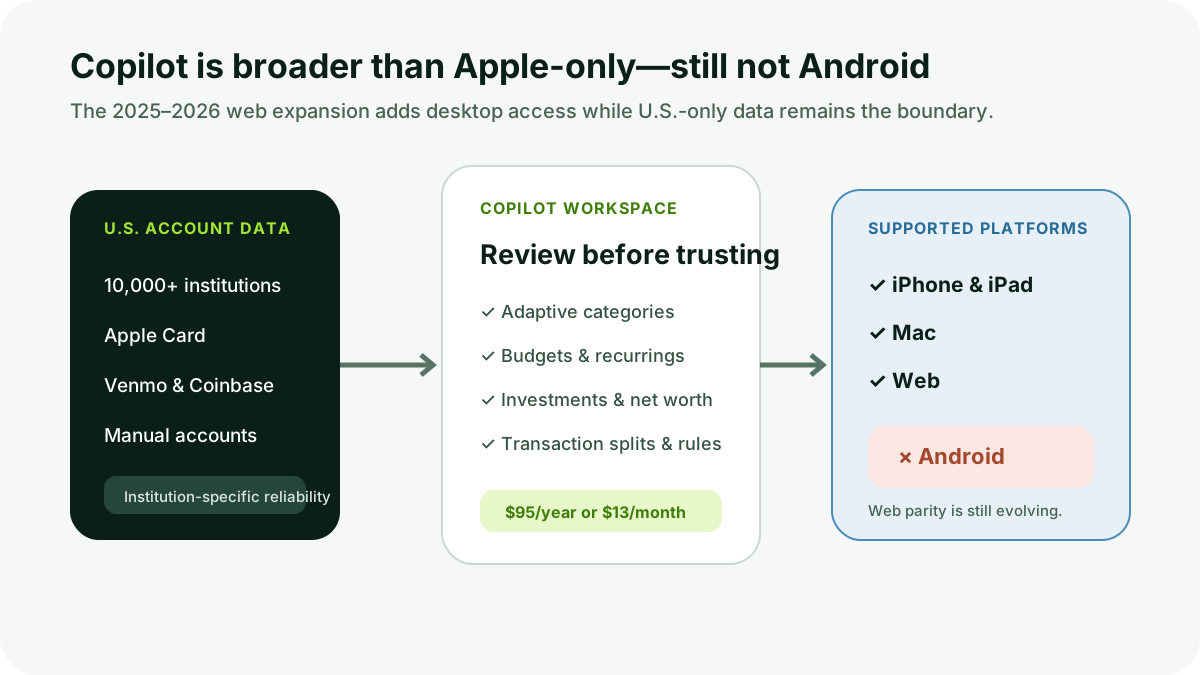
As of 2026, Copilot is no longer Apple-device-only. A web app launched in December 2025 and now covers most core workflows. The service remains U.S.-only and lists iPhone, iPad, Mac, and web as supported platforms. Android is not included.
| Review question | DollarScout finding |
|---|---|
| Best for | U.S. individuals who want a polished transaction-review and net-worth workflow |
| Price | $95 annually or $13 monthly |
| Trial | One month for new users |
| Platforms | iPhone, iPad, Mac, and web; no Android app listed |
| Main limitation | Newer web app does not yet match every Apple-platform action |
:::note Copilot Money is an independent personal-finance company and is not Microsoft Copilot. It tracks financial data but is not a bank, broker, investment adviser, or accounting system. :::
Pricing and trial
Value scores 4.0/5. Copilot’s current website lists $95 billed yearly, equivalent to about $7.92 per month, or $13 billed monthly. The annual option saves $61 compared with twelve monthly payments. New users receive a one-month trial, and there is no permanent free tier.
The site lets a prospect explore a sample experience before linking a financial account. That is useful for evaluating design without granting data access. The real trial should then test the household’s actual institutions, transaction cleanup, budgets, and investment data before renewal.
The price is competitive with YNAB and Monarch, but platform fit dominates value. An Android user receives no mobile app regardless of the annual discount. A U.S. Apple household that checks transactions frequently may use Copilot enough to justify the subscription; a passive user can obtain basic charts from bank and brokerage apps for free.
Copilot’s terms allow pricing changes and describe subscription fees as non-refundable, subject to the applicable billing channel. Read the checkout and app-store renewal details rather than assuming unused time will be refunded.
Transaction review and categorization
Ease of Use earns 4.8/5, the strongest category. Copilot imports transactions, suggests categories, highlights items that have not been reviewed, and learns from edits and rules. A concise review queue can turn financial maintenance into a repeatable routine rather than a monthly cleanup project.
Transactions can be renamed, recategorized, tagged, marked recurring, classified as income or internal transfer, and split. Copilot’s June 2026 web update supports equal or custom splits by amount or percentage. Correctly marking credit-card payments and transfers prevents them from appearing as spending or income.
Automation needs oversight. A familiar merchant can represent different categories, a refund can arrive under a payment processor, and a transfer may be one side of a pair. “AI categorization” reduces repetitive work; it does not remove the user’s responsibility to review exceptions.
The review-status concept is particularly useful. A household can distinguish transactions accepted as correct from activity that still needs a decision. Copilot is not documented as an unlimited multi-user household system like Monarch, so couples should evaluate access and collaboration expectations before sharing credentials or relying on one person’s workflow.
Budgets, spending, and recurring charges
Features scores 4.4/5. Budgets compare current spending with a planned monthly amount and support category rollovers. The dashboard displays a spending line and a Free to Spend value. Upcoming recurring charges, income, and cash flow help the user interpret whether a favorable current balance is already committed.
The Free to Spend value is a software calculation, not a bank balance or payment guarantee. Copilot’s own dashboard guide notes that recurring transactions expected later in the month are not included in the spending-line chart in the same way as already-posted activity. Users should keep bills and irregular expenses in the planning process rather than relying on one number.
Subscription detection is useful for identifying repeated merchants. It cannot cancel services or guarantee that every annual renewal is detected. App-store subscriptions should also be checked directly with Apple, Google, or the merchant.
Copilot supports savings views and cash-flow trends without imposing YNAB’s allocation method. That makes setup easier, but users who need every available dollar assigned to future obligations may prefer a more prescriptive product.
Investments and net worth
Copilot can combine bank, credit-card, loan, brokerage, retirement, crypto, real-estate, and manual account values into net worth. Investment views display holdings, allocation, balances, and performance estimates. Direct integrations include Coinbase, and the web product added further crypto connection work in 2026.
This is household monitoring, not portfolio accounting. Financial institutions can omit cost basis, misclassify holdings, or update at different times. A live-looking performance number is not necessarily time-weighted, tax-aware, or suitable for comparing managers. Brokerage statements remain the source for positions and tax documents.
Manual accounts cover property, cash, or unsupported assets. Use conservative values and a defined update cadence. Daily changes in estimated home value can make a net-worth chart feel precise without improving decisions.
Account connections
Account Syncing scores 4.3/5. Copilot’s FAQ advertises connections to more than 10,000 U.S. financial institutions and direct integrations with Apple Card, Venmo, and Coinbase. Onboarding uses a data aggregator; when an institution is not found through the default Plaid flow, the app can present another connection option. Manual cash and other accounts are also supported.
Coverage count is not a reliability guarantee. Connection health depends on institution APIs, authentication, account type, and provider. Copilot’s quick-start guide says some institutions can take longer than 24 hours to supply initial data and directs users to in-app support when loading remains incomplete.
Test the most difficult card, bank, retirement, loan, and crypto account during trial. Confirm transaction dates, pending behavior, holdings, and whether manual corrections survive refreshes. A beautiful dashboard with a stale primary account is not a complete financial picture.
Web, Apple devices, and Android
The web app launched in December 2025 and supports the dashboard, transaction filters and bulk edits, accounts, investments, categories, recurring charges, exports, and many daily actions. Copilot says some features are still in progress and intends fuller parity over time.
Platform Support should therefore be described precisely: iPhone, iPad, Mac, and web in the United States. There is no Android app listed. The web app gives Windows and Android-device owners a browser route on a computer, but it is not equivalent to an Android phone app with widgets and native mobile behavior.
One subscription works across the supported platforms and multiple devices. A user can review on a phone and perform bulk cleanup on the web without purchasing separate licenses.
Privacy and security
Copilot says it does not sell financial data or show ads. Its FAQ states that bank credentials are not stored by Copilot and that connections use secure data providers. The business model depends on subscriptions.
Security updates in 2026 added authenticator-app two-factor authentication on iOS, web, and Mac, plus global sign-out. Enable 2FA, protect the recovery email, review active sessions, and remove unused connections. Direct integrations and aggregation providers have their own authorization scopes that should be read during setup.
Copilot’s 2026 Dispatch also describes beta connections between financial data and external AI tools. Beta functionality should be treated separately from the core app. Do not authorize financial access to another tool until the data scope, read/write capability, retention, and revocation controls are understood.
Customer support
Customer Service receives 4.1/5. Copilot provides in-app chat and a current help center with task-specific guides. Connection errors can be escalated after initial loading or refresh attempts. Product documentation has been updated actively as the web app evolves.
DollarScout did not submit and time a support request. Bank-linking issues can involve the institution or data provider, so the service may diagnose or escalate without controlling the repair timeline. There is no branch or phone-based financial institution behind the app.
Alternatives
Choose Monarch Money when Android, unlimited household collaborators, broad reports, and provider flexibility matter more than Copilot’s interface. Choose YNAB when assigning available dollars and funding future expenses should drive every spending decision. Choose PocketGuard for a simpler leftover calculation, debt payoff plan, and lower annual price.
Copilot is strongest for an individual who values frequent review and visual clarity. A household with mixed Android and Apple devices should not force a platform mismatch for design alone.
Who should use Copilot Money
Copilot fits users who:
- Live in the United States and use iPhone, iPad, Mac, or web.
- Want automated categories with an explicit transaction-review queue.
- Track spending, recurring charges, investments, and net worth together.
- Will test hard-to-connect institutions during the one-month trial.
- Prefer subscription revenue over an ad-supported financial dashboard.
It is easier to skip when Android, non-U.S. institutions, a permanent free tier, unlimited household collaboration, or business accounting is required.
Bottom line
Copilot Money earns 4.3/5. Its transaction review, categorization, design, budgets, recurring views, investments, and net worth create one of the most approachable paid finance experiences. The 2025–2026 web expansion materially increases its usefulness beyond Apple hardware.
The limitations remain concrete: $95 annually, no free tier, U.S.-only connections, no Android app, and incomplete web parity. Use the month-long trial to test actual institutions and recurring maintenance. Copilot is worth paying for when the polished workflow increases financial attention; it is not worth paying for merely to admire a cleaner dashboard.