Many products on this page are from partners who compensate us. This doesn't influence our ratings. Our opinions are our own.
Free Budget Spreadsheet Templates
By Sophie Brown, Senior Finance Editor · Updated Jul 2026 · Fact-checked Jul 18, 2026
A free budget template saves time only when its formulas are correct, its categories match real cash flow, and its access requirements are proportionate. Instead of presenting an unverifiable “best templates” list, this guide shows which template structure fits each use case, where to find trustworthy starting points, and how to audit a file before adding financial data.
Key takeaways
- Start with official or clearly attributable templates and make a private copy before entering information.
- Choose by budgeting method and maintenance workflow, not by dashboard appearance.
- Test formulas with a small known example and reconcile totals before importing transaction history.
- Reject templates or scripts that request permissions unrelated to the budget.
- Preserve an untouched master, a dated working copy, and the raw account statements used for reconciliation.
“Free” is not the same as ready
A template can provide useful table structure, formulas, and visual hierarchy. It cannot know the household’s take-home income, irregular obligations, account boundaries, debt terms, or savings priorities. Downloading a workbook is the beginning of setup, not the completion of a budget.
Consumer.gov offers an official budget worksheet and describes the basic process: list bills and expenses, record monthly income, subtract outflows, track spending, and use the result to plan the next month. The CFPB recommends looking back across several months and including infrequent costs. Any template under consideration should make those tasks easier and visible.
Trustworthy places to start
Prefer a template published by the software provider, a government consumer-education site, or an organization whose ownership and instructions are clear. Useful starting points include the Consumer.gov Budget Worksheet and the built-in template galleries available through Google Sheets or Microsoft Excel. Availability and gallery contents can change by account, locale, and product version, so search inside the application rather than relying on an old third-party download link.
An official source does not guarantee that the template fits your circumstances. It does reduce uncertainty about who created the file and where it came from. Make a copy into an account or folder you control. Do not enter real information into a public “view-only” sheet or request edit access to a shared master.
If a third-party template is uniquely useful, verify the publisher, inspect the destination URL, scan downloaded files with current security tools, and review macros, scripts, external links, named connections, hidden sheets, and permissions. A static budget workbook should not require access to email, contacts, or unrelated Drive files.
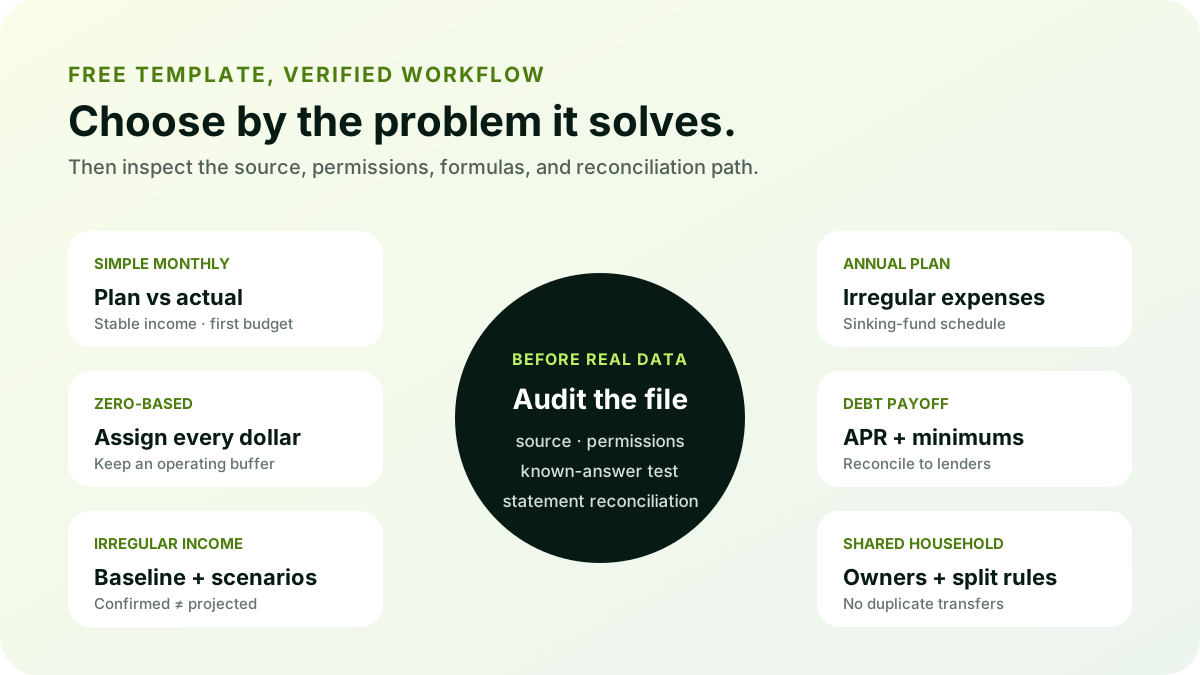
Choose the structure before the design
Simple monthly budget
This format lists income, planned expenses, actual expenses, and differences for one month. It is appropriate for someone starting with a few accounts and relatively stable income. Look for separate planned and actual columns, a place for irregular costs, and a clear surplus calculation.
Its weakness is history. A file copied independently every month can fragment category definitions and make trends difficult. Prefer a version with a continuous transaction ledger or a clearly documented archival process.
Zero-based allocation template
A zero-based plan assigns all available income to spending, saving, debt, or a buffer so planned income minus planned uses equals zero. That does not mean the bank balance reaches zero. The template should distinguish planned allocation from actual cash and preserve an operating buffer.
This format suits people who want an explicit job for every dollar. It becomes brittle when variable income is entered optimistically or irregular expenses are omitted. Use conservative income and sinking-fund lines.
Irregular-income template
Freelancers, commission earners, and seasonal workers need more than a standard salary grid. A useful template separates confirmed income from projected income, identifies a baseline essential budget, holds tax and operating reserves where relevant, and defines rules for surplus months.
Reject a template that averages last year’s income without showing the volatility behind the average. Scenario columns—baseline, expected, and strong month—are more informative than one precise forecast.
Annual or sinking-fund planner
An annual view maps insurance, tuition, subscriptions, gifts, travel, repairs, taxes, and other uneven costs across twelve months. It is valuable as a companion to the monthly budget. The important formula divides the expected cost across the remaining funding periods and tracks the actual reserved balance.
Check that paying the final bill does not count both the monthly savings allocations and the payment as consumption. Transfers to an included sinking-fund account should be measured as goal progress and excluded from duplicate expense totals.
Debt payoff template
A debt workbook should record current balance, APR, minimum, due date, promotional expiration, and extra payment. It should protect every minimum, model either avalanche or snowball order, and reconcile projected balances with lender statements.
Any payoff date is an estimate. Daily interest, fees, new charges, rate changes, and payment timing can cause differences. The FTC recommends contacting creditors early when bills cannot be paid; a template should not imply that a formula replaces creditor communication or qualified counseling.
Shared-household template
A shared budget needs ownership and split rules. It should distinguish joint expenses, individual expenses, reimbursements, and internal transfers without double-counting them. Add a review status and name the person responsible for resolving each item.
Google Sheets can simplify browser collaboration, while cloud-hosted Excel can also support shared workflows depending on the setup. In either case, link sharing and cell protection require careful configuration. Protected ranges are not a substitute for privacy.
A 12-point audit before using a template
- Source: Can you identify the publisher and original page?
- Ownership: Are you working in a private copy you control?
- Permissions: Does any script or add-on request unrelated access?
- Hidden content: Are there hidden tabs, rows, columns, names, or external links?
- Date basis: Does it use real dates and the correct locale?
- Income basis: Is planned income take-home income and reasonably conservative?
- Transfers: Are internal transfers excluded from income and expense totals?
- Signs: Are inflows and outflows handled consistently?
- Irregular expenses: Are annual and seasonal costs included?
- Formula coverage: Do formulas include new rows, all months, and every category?
- Errors: Are broken lookups exposed instead of converted silently to zero?
- Reconciliation: Can workbook balances be compared with real statements?
Inspect cells rather than trusting a polished chart. Trace the total back to its range. Look for constants typed into formula columns, formulas that stop above the final row, and totals that include other totals. Check whether a category renamed on one tab breaks a lookup elsewhere.
Run a known-answer test
Before entering real history, create a tiny test month:
| Item | Amount |
|---|---|
| Take-home income | $4,000 |
| Rent | $1,400 |
| Groceries | $500 |
| Utilities | $200 |
| Saving | $600 |
| Other planned spending | $900 |
The expected remainder is $400. Add one $50 grocery transaction above plan and confirm the actual variance becomes negative $50 while the original planned amount remains unchanged. Add a $200 transfer from checking to savings and confirm it does not create $200 of new income or consumption. Deliberately type an unknown category and confirm the workbook exposes it.
Then test boundaries: add a transaction on the first and last date of the month, a negative refund, and a blank row. If the outputs cannot be explained from those records, do not add private data yet.
Customize without breaking the model
Save an untouched master first. In a dated working copy, rename categories through the designated setup table instead of editing labels scattered across formulas. Add categories only when they support a decision; consolidate categories that never change behavior.
Define account scope. If checking, savings, and two cards are in the workbook, transfers among them should net to zero. Cash transactions need a consistent process. Credit-card purchases should be recorded when the purchase posts; the later payment is a transfer between included accounts, not a second expense.
Add irregular-expense lines based on actual statements. The CFPB advises reviewing several months and specifically mentions costs such as insurance, medical expenses, school items, gifts, and vacations. A template that balances only because these costs are absent is not complete.
Privacy and security checks
Store only the information needed for decisions. Merchant descriptions, dates, accounts identified by a short nickname, and amounts are usually enough. Full card numbers, online-banking passwords, security answers, tax identifiers, and recovery codes do not belong in a budget file.
Review sharing settings before and after collaboration. Use unique account credentials and appropriate multifactor authentication on the storage account. Keep recoverable backups, but protect backup locations too. If the template contains macros or scripts, understand what triggers them, which services they access, where logs appear, and how to disable them.
Google’s documentation says protected sheets and ranges should not be treated as security because content can still be copied or exported by people who have access. Use protection to reduce accidental edits, and use access control to limit who can reach the file.
Maintain the template after setup
A budget becomes useful through a monthly close. Reconcile transaction totals and ending balances to statements, resolve unclassified rows and duplicates, compare planned with actual, and document material differences. Copy the next month from the reviewed structure rather than from an uncorrected original.
When an application update, formula edit, or category restructure occurs, repeat the known-answer test. Keep the raw account exports used for each import. If the workbook stops reconciling, the ability to rebuild from source data is more valuable than preserving a complex dashboard.
Bottom line
The best free budget template is a transparent starting structure that matches the user’s income pattern, planning method, and update routine. Prefer attributable sources, create a private copy, inspect formulas and permissions, run a known-answer test, and require statement reconciliation. A plain workbook that passes those tests is better than a beautiful dashboard whose totals cannot be traced.
Related content
Frequently asked questions
Sources
Related content
More from DollarScout on this topic.
